The problem with form leads sitting in an inbox
A contact form is not a lead system. It is a notification. Someone fills it in, an email lands in a shared inbox, and whoever opens that inbox first decides what happens next. That is the setup in most of the businesses we audit, and it is why leads sit overnight.
The research on this is old and worth reading anyway. When Oldroyd, McElheran and Elkington audited 2,241 US companies for Harvard Business Review in 2011, average first response time was 42 hours, only 37 percent replied within an hour, and 23 percent never replied at all. The often quoted 21x qualification advantage for a five minute response comes from an earlier 2007 MIT and InsideSales dataset, so treat that number as directional rather than a law. The direction has never been in dispute.
One of our clients, a fitness coach, was handling intake by hand. Inquiries arrived, someone saw them eventually, and often that was after the person had already moved on and booked elsewhere. We rebuilt the form inside GoHighLevel, wired an internal notification to the person who should actually be answering, and set an automated first reply to fire the moment someone submitted. Their client acquisition went up after that. We cannot publish the numbers, since most of our agreements do not allow it, but what they noticed first was not a metric at all. It was that inquiries stopped disappearing.
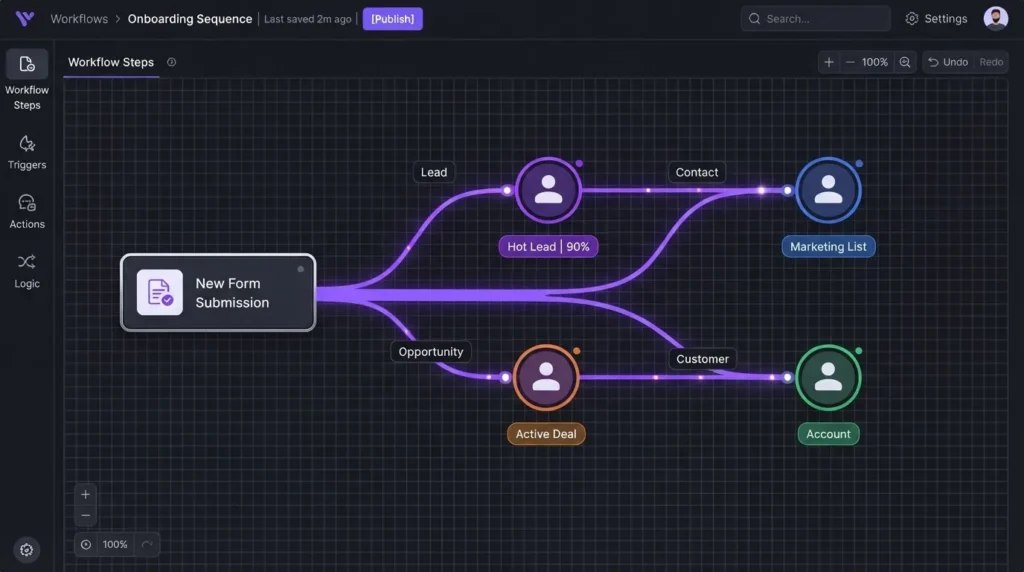
Here is the build. It runs in GoHighLevel, but the logic transfers to any CRM with conditional workflows. Before you build, it is worth asking whether GoHighLevel is worth the switch in the first place. We use this same pattern to connect your tools and cut repetitive work across every client we take on. And once a lead is routed, whether the ad spend behind that lead was even worth it is decided more by reply speed than by the campaign settings.
What you will have working
By the end, a submission on your site will do all of this without anyone touching it:
- Create or update the contact record
- Tag it by the service the person actually asked about
- Assign it to the right owner
- Send a first reply that references their service, in under two minutes, at any hour
- Alert the owner internally
- Fall back to a default owner when the routing value is missing or wrong
Setup time is about 45 minutes for the first service, then roughly 10 minutes per additional branch.
Before you start
A GoHighLevel sub-account with Automation access. Build in a test sub-account first, then rebuild or clone into the live account once every branch is verified.
Disclosure: some GoHighLevel links in this article are affiliate links. If you sign up through one, BDGS Digital may earn a commission at no extra cost to you. It does not change what we recommend.
Owners who exist as users in that sub-account. Assigning to a person who is not a user fails quietly.
If your form lives outside GHL, on Elementor, Gravity Forms, Webflow or a custom build, you will need the Inbound Webhook trigger. It is a premium trigger, so confirm premium actions and triggers are enabled on the sub-account before you plan the build around it.
A decision about who owns what. People skip this and then try to make the builder produce the decision for them. It will not. If you are still deciding whether the platform is worth the investment at all, our honest read on whether GoHighLevel is worth the switch in the first place covers that question separately. If you are rebuilding after a migration, the migration checklist to run before you rebuild this covers the identifier and load order decisions that decide whether the workflow fires at all.
Step 1: Write the routing table before you open the builder
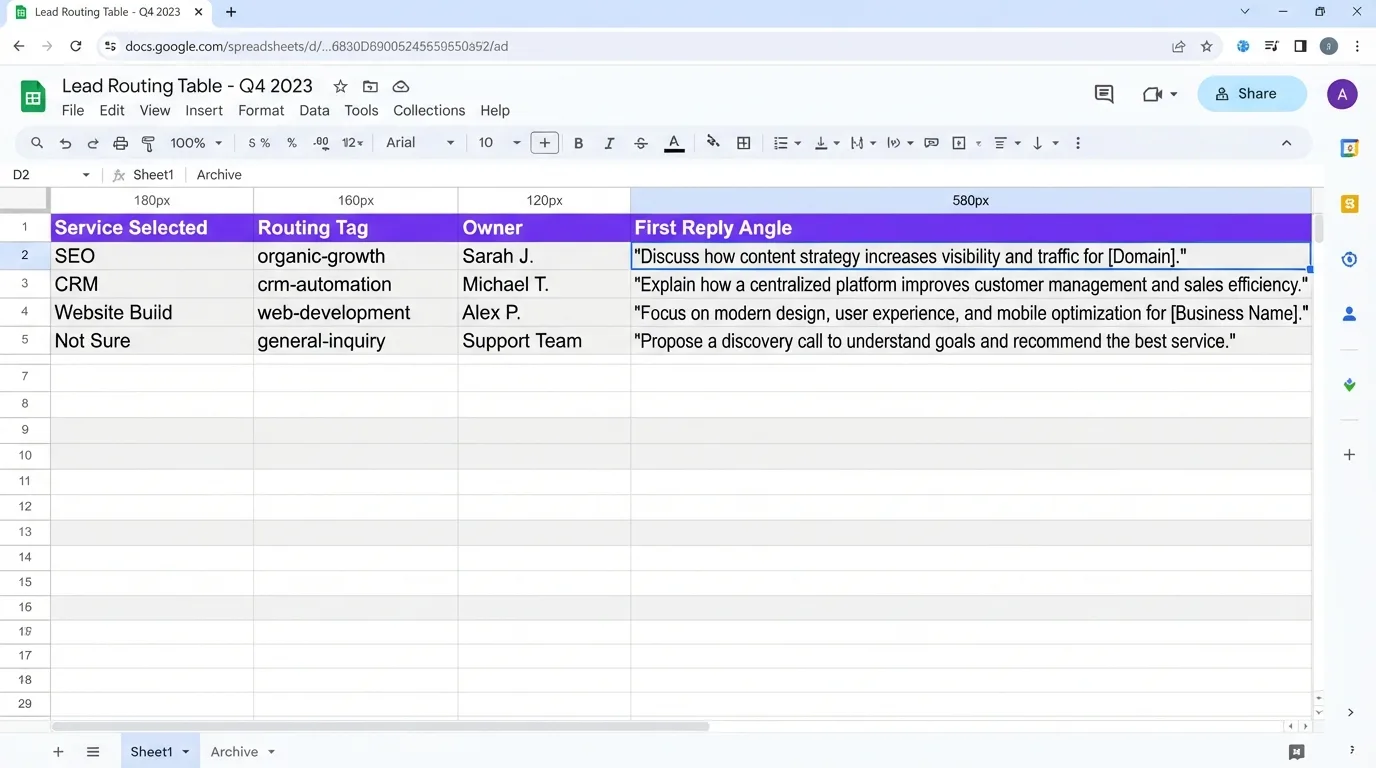
Open a sheet. Four columns, one row per path a lead can take. This takes ten minutes and it removes most of the rework later.
| Service selected | Routing tag | Owner | First reply angle |
|---|---|---|---|
| SEO | route-seo | Owner A | Ask for the domain and current traffic source |
| CRM or automation | route-crm | Owner B | Ask which tools they are trying to connect |
| Website build | route-web | Owner A | Ask for the current site and the deadline |
| Not sure | route-triage | Default owner | Send the calendar link, no qualifying question |
One rule that saves pain: a tag used for routing should never double as a campaign tag or a reporting tag. Prefix them, route-seo, route-crm, route-web. When routing tags and campaign tags share a namespace, a contact ends up in three workflows and nobody can work out which one sent the message.
Step 2: Make the form carry the routing value
The workflow needs something to branch on, and it needs to be a field, not a sentence buried in a message box. Two options that both work:
A required dropdown asking what they need help with, where the values match your routing table character for character. Copy and paste them across, do not retype. A trailing space in a condition is a real thing and it is miserable to debug.
Or a hidden field set per page, so the form on your SEO service page submits service equals seo without asking anyone anything. This converts better because it removes a question, and it is more accurate because visitors are bad at self categorising.
Map the field to a proper custom field in the CRM. A value sitting inside a free text message cannot be branched on cleanly.
Step 3: Connect the form to the workflow
If the form is built in GoHighLevel
Use the Form Submitted trigger. It fires on GHL hosted and embedded forms. Add a trigger filter for the specific form so unrelated submissions do not enrol, and set your re-entry rule on purpose rather than leaving the default.
If the form lives on your own site
Use the Inbound Webhook trigger. GoHighLevel generates a unique URL for that trigger and accepts POST, GET or PUT requests, so your form or middleware can post JSON to it. See the Inbound Webhook trigger documentation and the premium trigger guide for details.
POST https://services.leadconnectorhq.com/hooks/YOUR_HOOK_ID/webhook-trigger
{
  "first_name": "Ana",
  "email": "ana@example.com",
  "phone": "+639171234567",
  "service": "seo"
}
Send one real test submission before you try to map anything. The mapping panel reads from requests it has actually received, so you need a request in the log to map against. One constraint to plan around: the Create or Update Contact action needs an email or a phone in the payload. Without one, the workflow still runs, but it runs contactless and there is no record to tag.
Step 4: Tag, then branch
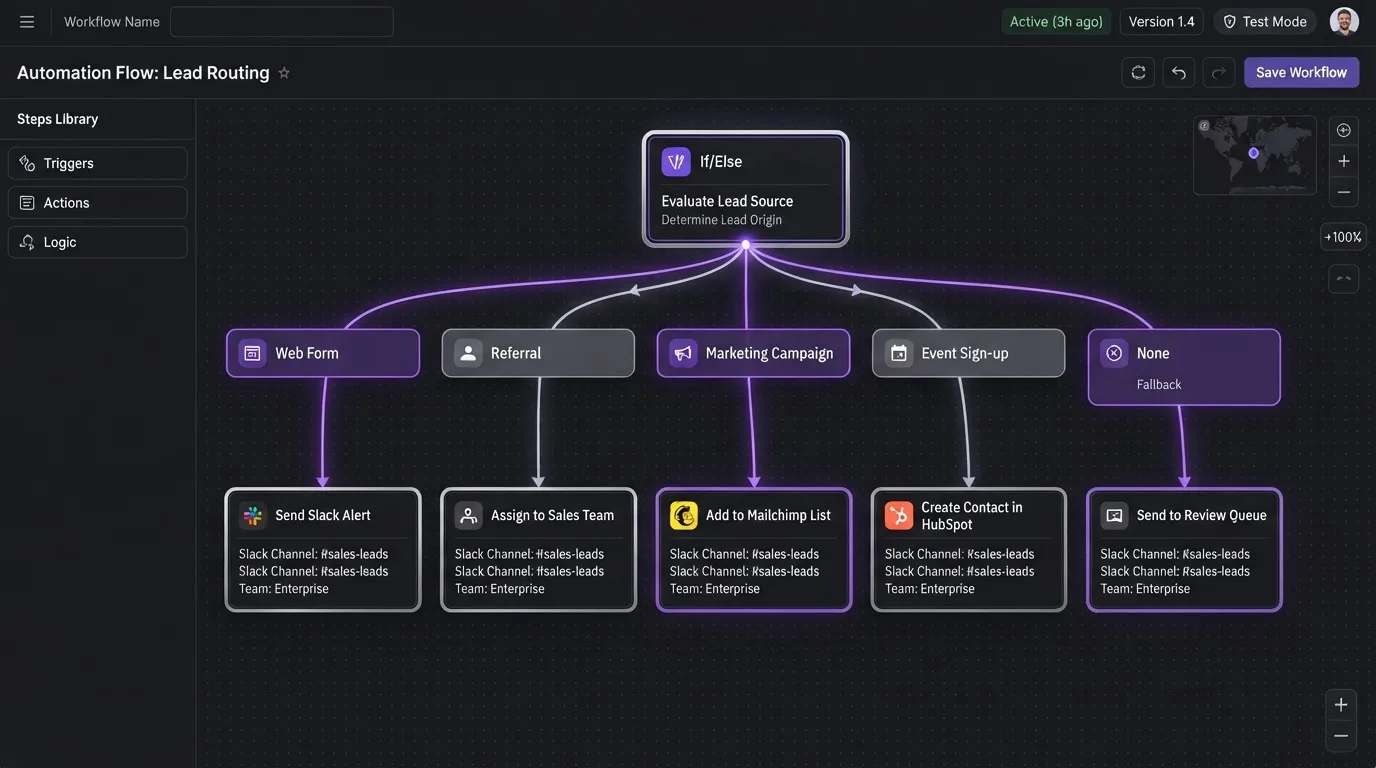
Order matters here. Three actions, in this sequence:
- Create or Update Contact, mapping name, email, phone and the service field
- Add Tag, taken from your routing table. The same tagging discipline answers whether your AI referral traffic actually converts, once you tag by referring domain instead of by service.
- If/Else
Inside If/Else, each branch is a condition group and you add more with Add Branch. GoHighLevel creates a None branch automatically. It runs when nothing else matches, it cannot be deleted, and that is a feature rather than clutter. It is the branch that catches the day someone edits the website dropdown and renames a value. See the If/Else action documentation for branch and None branch behavior.
Branch on the custom field rather than on the tag you just applied. The tag is for segmentation and reporting later. Branching on the field you already captured is one less dependency in the chain. This is also why we insist on a CRM that stays clean: routing logic built on a messy custom field set is a debugging nightmare.
Step 5: Assign the owner, then alert them
Inside each branch: Assign to User first, then the internal notification. That order matters because the alert can then reference the assigned owner, and because an unassigned contact is an orphaned contact even when the notification lands.
If two people share a service, round robin distribution works. Use it only when both people genuinely cover that service. Round robin across mismatched skills does not remove the delay, it just moves it from the queue to the handoff.
Step 6: The first reply, under two minutes
Each branch gets its own first message referencing the specific service. Thanks for reaching out about SEO for your clinic performs better than Thanks for your inquiry, because the second one reads like it was sent by a machine that did not read the form.
Add a wait of 30 to 60 seconds before it sends. A reply that arrives in the same second as the form submission announces itself as automated, and reply rates drop.
Give the message one job. One question, or one calendar link. Not both, and definitely not a newsletter signup.
Where people get stuck
Five failure points, in the order we hit them most often.
- Condition strings that do not match. SEO and seo and seo with a trailing space are three different values to a condition. Pull the exact string from a real submission and paste it in.
- The owner gets notified but never assigned. Follow up dies because nobody owns the record, and the notification email gets buried like every other notification email.
- Re-entry rules left on default. A returning contact submitting a second form may not re-enter the workflow. For a service business where someone inquires twice about different services, that is a lost lead.
- Testing with your own email address. Your record already carries tags and may already be sitting in the workflow. Use a fresh address for every test.
- Untested branches. Most people test the happy path and publish. The None branch is the one that matters on the day the form changes.
How to verify it actually works
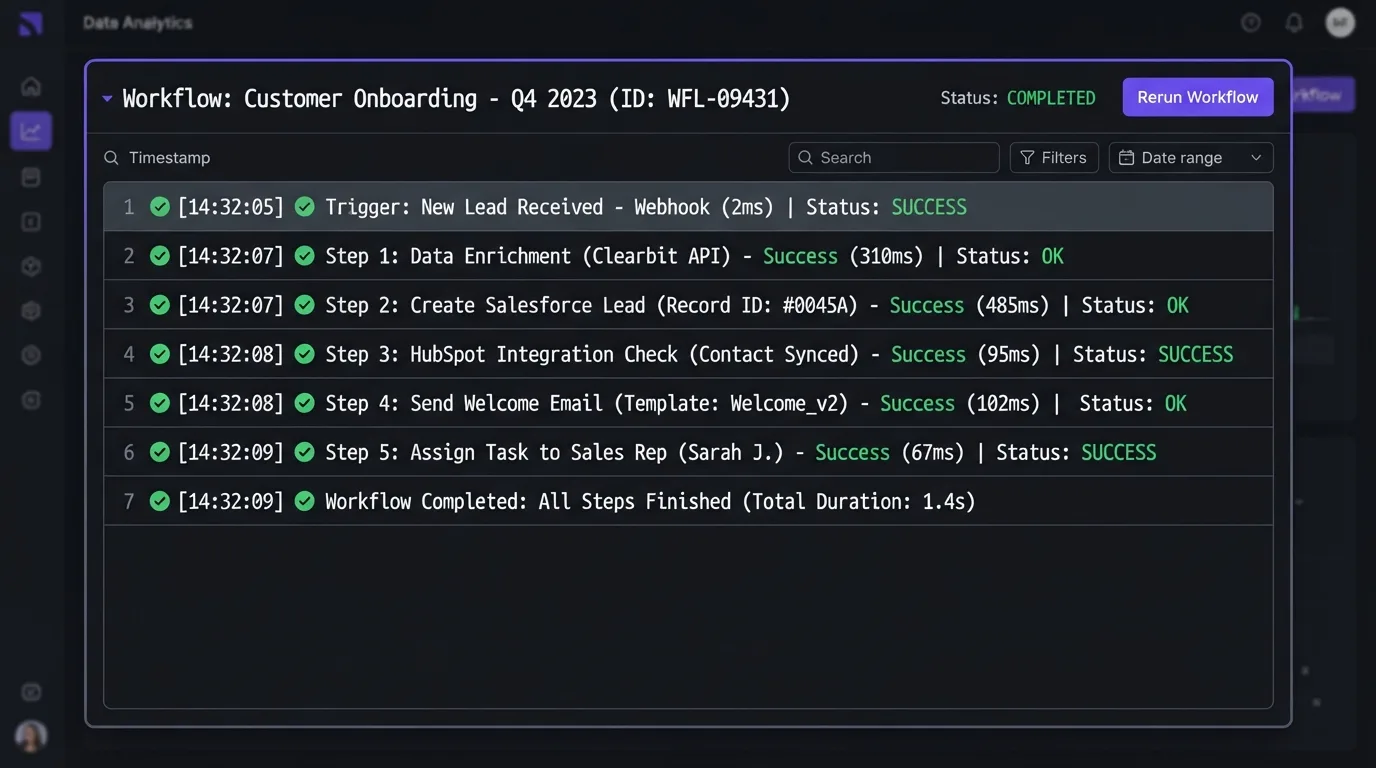
Submit five test entries: one per service, plus one with the routing field left blank or filled with junk. For each, check five things.
- Contact created with the service field populated, not empty
- Correct routing tag applied, and only that routing tag
- Correct assigned user on the contact record
- Internal alert received by the right person
- First message sent, and the timestamp gap from submission to send
Then open the workflow execution log for each test. The log is the source of truth. Receiving the email only proves the message step ran, not that the routing was correct.
What to build next
Two extensions worth adding once this is stable. First, a reassignment step: if the owner has not logged an action within a set window, reassign and alert a manager. Speed to first reply is solved by automation, speed to first human contact is not. Second, a dashboard tracking time to first human touch, split by owner. That number is usually worse than everyone assumes, and it is the one that predicts close rate.
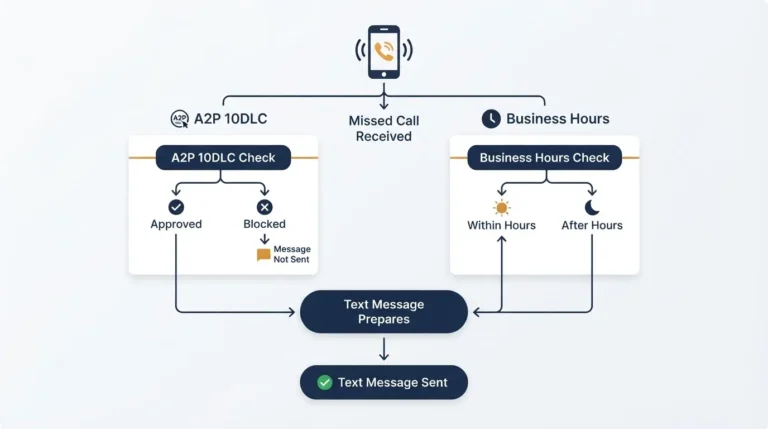
If you are connecting more than one lead source, the same If/Else pattern handles Facebook lead ads, Google Ads lead form extensions and phone inquiries. The routing table gets longer, the logic does not change. Phone leads come with their own twist, though: the missed call text back compliance gap is a channel with its own A2P 10DLC registration and quiet-hours checks that form routing never runs into. Once routing is working, the next layer is deciding which system owns which field so the sync does not overwrite your attribution data. This is the foundation of most lead generation systems we build. The same tagging discipline is also what lets you answer whether your AI referral traffic actually converts once it lands in the CRM.
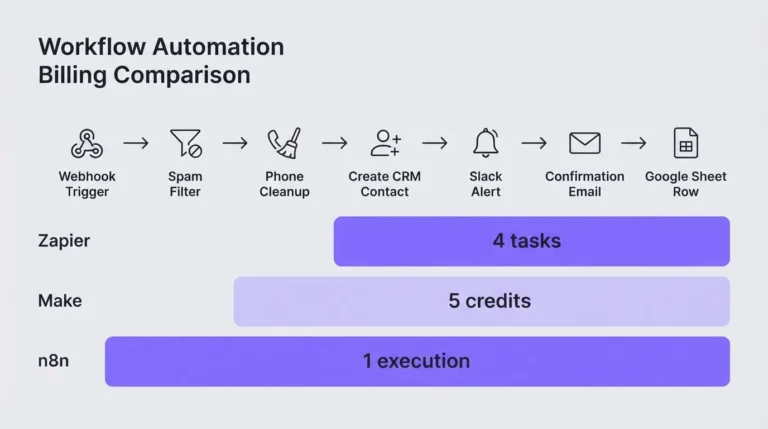
Once your leads are routed and replied to, the next decision is usually whether to put more budget behind the campaign that produced them. Before you scale, run whether an ads manager is worth paying for against the break-even calculation, since the whole point of routing leads well is that it changes what a management fee is worth at your spend level. If you decide the routing itself should live outside the CRM in a connector tool, see what the same workflow costs on Zapier, Make, and n8n before you pick one, since the billing units decide which is cheapest at your volume. And if your bot is the one replying on any of those channels, check whether that same bot needs to disclose it’s AI under the chatbot disclosure rules now taking shape, since a multi-channel reply setup is exactly the kind of bot those rules reach for.
Frequently asked questions
Yes. Use the Inbound Webhook trigger instead of Form Submitted. It generates a unique URL that accepts POST, GET or PUT requests, so an Elementor, Gravity Forms or custom form can post JSON to it. Include an email or phone in the payload, otherwise the Create or Update Contact action has nothing to match on.
Branch on the custom field the form submitted. The tag is for segmentation and reporting later. Branching on the field you captured directly removes one dependency, because you are not relying on a tag being written before the condition is evaluated.
The contact falls into the None branch, which GoHighLevel creates automatically and which cannot be removed. Put a default owner and a generic first reply there. Without it, a renamed dropdown value on the website silently sends leads nowhere.
Under two minutes is a reasonable target, with a short delay of 30 to 60 seconds before it sends. An instant reply reads as automated and gets fewer responses. The point is not the speed record, it is that the lead gets a relevant reply before they contact someone else.
No. One workflow with If/Else branches is easier to maintain than four near identical workflows. Separate workflows are worth it only when the follow up sequences diverge heavily after the first few days, for example when one service has a long nurture and another books immediately.
One last thing
If you have built this and it broke somewhere we did not mention, we want to hear where. Our version broke at the handoff every time, until we stopped treating the internal notification as the end of the automation and started treating it as the start of a timer.
If your CRM, forms and follow up are supposed to be one system and they keep breaking at the seams, book a strategy call. We will map what you have now and where it is leaking.
Want to try GoHighLevel for yourself? You can get started with GoHighLevel here.