Zapier charges per task. Make charges per credit. n8n charges per execution. Those three words sound interchangeable and are not, and most Zapier vs Make vs n8n comparisons skip that part and go straight to a feature table.
So we did the boring thing. We took one workflow we build all the time, a website lead intake, and priced it on each platform using their own pricing pages and definitions. Then we did it again at ten times the volume, because that is where the surprises live.
The workflow we priced
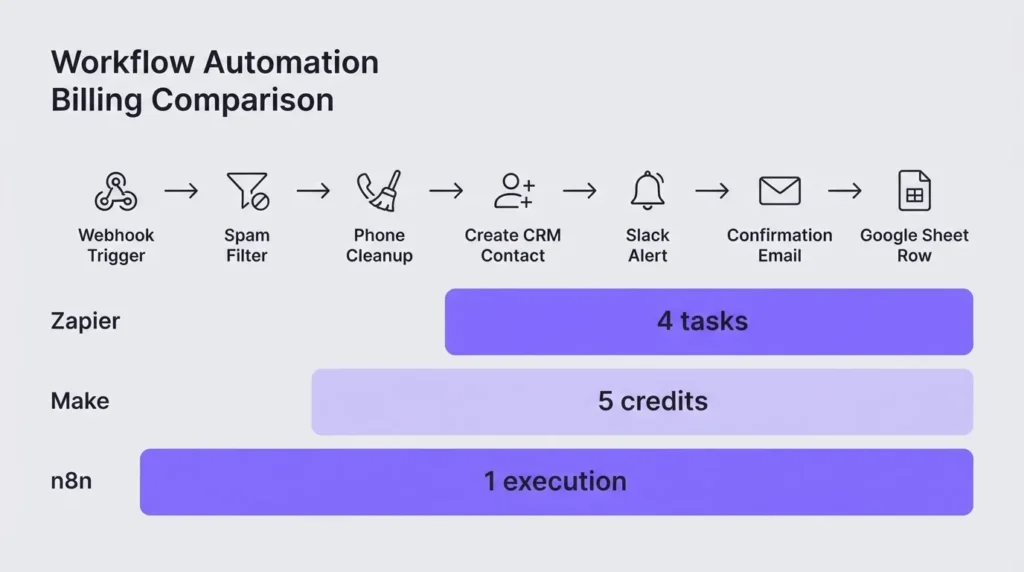
A lead fills in a quote form on a service business website. Then:
- The form sends the submission to the automation tool (webhook trigger).
- A filter drops obvious spam.
- The phone number gets cleaned into one format.
- The contact is created or updated in the CRM.
- The sales team gets a Slack alert.
- The lead gets a confirmation email.
- A row is added to a Google Sheet the owner likes to look at.
Seven steps. Nothing exotic. The volumes, 300 and 3,000 leads a month, are illustrations, not a client’s numbers.
How each platform counts
Zapier counts tasks. Its pricing page says a task is used when a Zap successfully moves data or completes an action. Triggers do not count, and neither do Filter, Formatter, Paths, Delay, or Looping by Zapier. Code steps and AI steps do count, and MCP tool calls use 2 tasks each. So in our workflow, only steps 4 to 7 cost anything: 4 tasks per lead.
Make counts credits. Its pricing page says each module action in a scenario counts as one credit, with router and error handler modules excluded, and code execution billed at 2 credits per second. Make’s operations help page adds a detail that matters a lot: a polling trigger counts one operation per check, not per record it finds. Built with a webhook, with the filter set on the route and the phone cleaned with Make’s built-in functions inside the CRM step, our workflow uses 5 modules per lead.
n8n counts executions. Its pricing page defines an execution as a single run of the entire workflow, no matter how many steps or how much data. So: 1 execution per lead.
The same workflow, priced three ways
Here is the side by side, using each platform’s own entry paid plan and counting rules:
| Zapier | Make | n8n Cloud | |
|---|---|---|---|
| Unit per lead | 4 tasks | 5 credits (webhook build) | 1 execution |
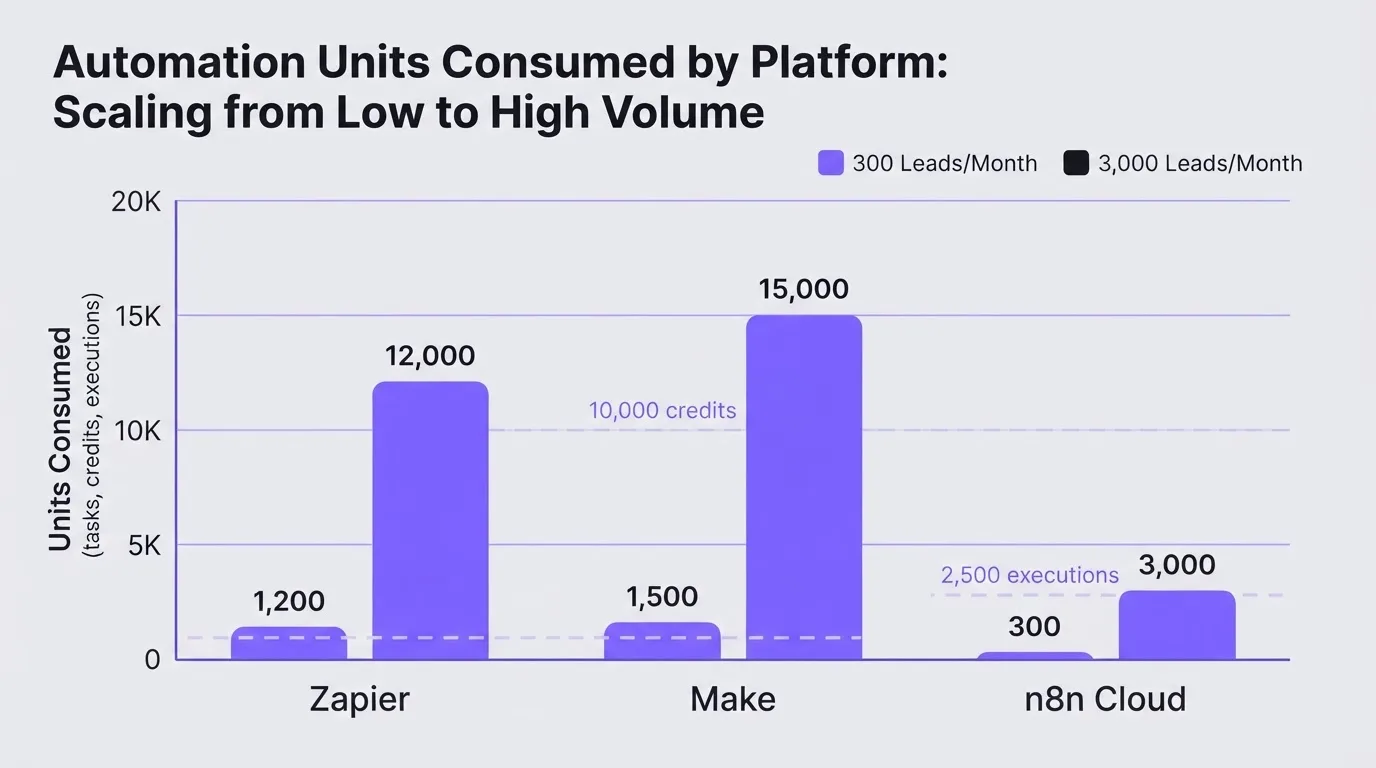
| 300 leads a month | 1,200 tasks | 1,500 credits | 300 executions |
| 3,000 leads a month | 12,000 tasks | 15,000 credits | 3,000 executions |
| Entry paid plan (from each pricing page) | Professional from $19.99/month, 750 tasks | Core $12/month, 10,000 credits | Starter €20/month (annual billing), 2,500 executions |
| Fits the entry plan at 300? | No, 1,200 is above 750 | Yes | Yes |
| Fits the entry plan at 3,000? | No | No, needs extra credits | No, Pro is €50/month for 10,000 |
At small volume, Make and n8n both sit comfortably on their entry plans while Zapier already needs a bigger task tier. At higher volume, n8n’s per-run counting pulls far ahead, because adding a step to the workflow costs nothing extra.
That last point is the one that changes how people build. On Zapier and Make, every step you add is billed on every lead. On n8n, it is not. We have seen Zapier builds deliberately stripped down, a Slack alert here or a logging step there removed, purely to save tasks. That is a pricing model shaping your operations, and it is worth noticing.
The polling trap on Make
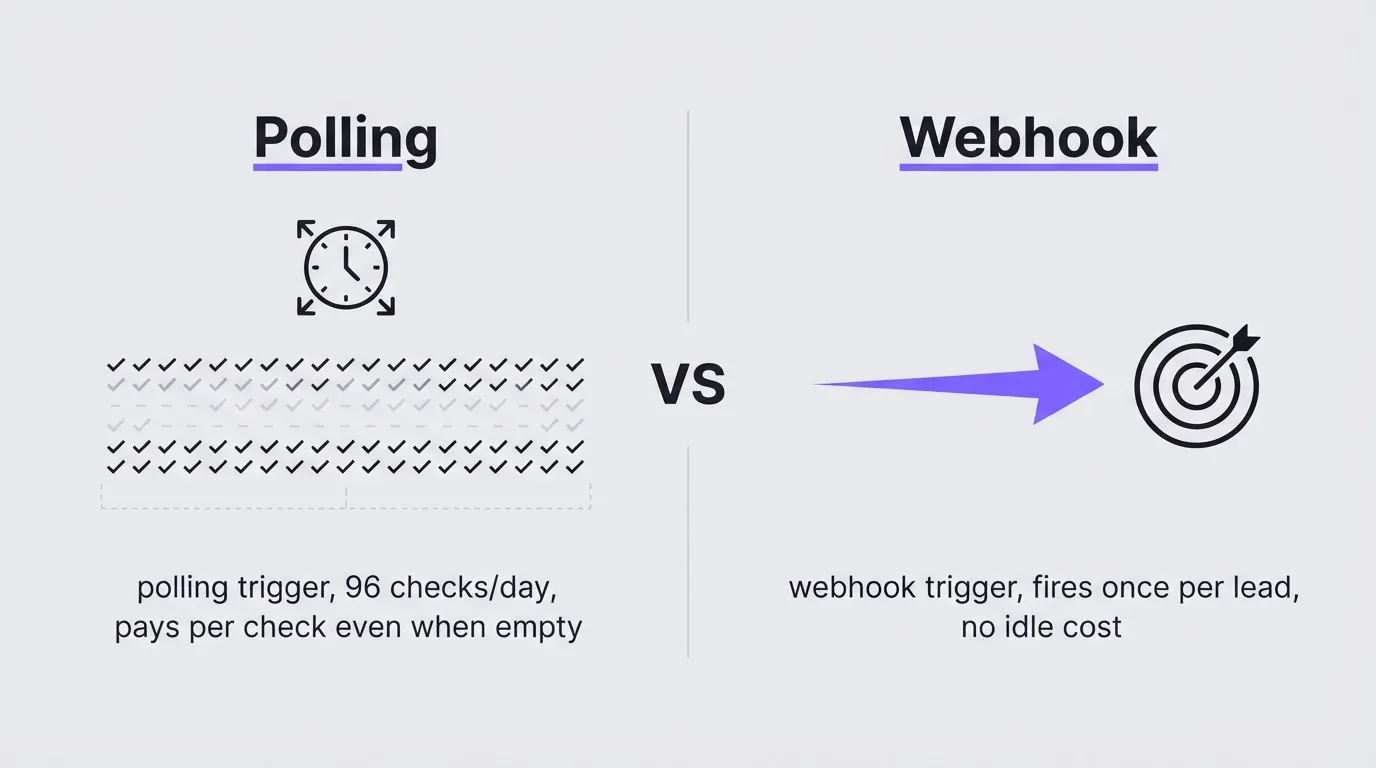
Change one thing in the Make build and the math moves. If the scenario uses a polling trigger (for example, watch new rows on a sheet) instead of a webhook, it checks on a schedule and each check is an operation.
Checking every 15 minutes is 96 checks a day, roughly 2,880 a month. Make’s help page describes the charge per check rather than per record found, so we plan as if quiet checks count too; your scenario history will show you whether they do on your account. That is nearly double the actual work in our 300-lead example. Checking every minute would be about 43,200 a month, more than four times Core’s 10,000 credits, spent on asking anything new.
Use instant triggers (webhooks) wherever the source app supports them. It is the cheapest fix in all of automation.
What happens when you run out
This is the part that matters more than the monthly price, and the three platforms behave very differently:
- Zapier switches you to pay-per-task billing when you hit your limit, unless you have turned that off, and its pricing page says overage tasks are charged at a higher rate than your plan’s tasks. Your workflow keeps running. Your bill creeps.
- Make stops. Its pricing page is clear that scenarios will not continue to run until credits are added, with warnings at 75 and 90 percent usage and an optional auto-purchase of extra credits on paid plans. For a lead intake workflow, a stopped scenario means leads sitting in a form inbox that nobody is watching. Turn on auto-purchase or at least route the 90 percent warning to a person who will act on it.
- n8n Cloud lists overage pricing on its Business plan and says it contacts customers as they near their quota. Self-hosted n8n has no execution cap at all, because you are running it.
Which one we would pick, and when
Our opinion, and it will annoy fans of every tool. Start with what your CRM already does. That is the practical core of a connected growth system: fewer tools, fewer handoffs. Most of what small businesses want (form to contact, tag, alert, confirmation email) runs natively in GoHighLevel or HubSpot workflows without any per-task meter. We reach for an outside tool only for the connection the CRM cannot make. We walk through that native approach in our lead routing tutorial.
- Zapier when the business owner or their VA will maintain the automation themselves and the volume is low. It is the easiest to read and to fix at 10pm without calling anyone. You pay for that.
- Make when the workflow has branching logic and moderate volume, and someone is comfortable with its visual builder. Build with webhooks, and set up the credit alerts on day one.
- n8n Cloud when volume is high or the workflows are long, since steps are free inside an execution.
- Self-hosted n8n only if someone on the team will own updates, uptime, and backups. The license is free. The on-call duty is not. A lead workflow that dies on a Saturday because a server filled up is not cheaper than a Zapier bill.
The mistake we see most often is picking the cheapest per-unit tool as the default for every business. It is not the right default. The cost that hurts is the hour a broken automation goes unnoticed, and that depends more on who watches it than on which logo is on it.
If you run one of these at real volume and your numbers look different from ours, tell us. We would rather update this table than defend it.
Frequently asked questions
For most multi-step workflows at small and medium volume, yes. Make’s Core plan lists 10,000 credits for $12 a month, while Zapier’s Professional plan starts at $19.99 a month for 750 tasks. The gap narrows if a Make scenario uses polling triggers, since Make counts a polling trigger as one operation per scheduled check.
A task is used when a Zap successfully completes an action, such as creating a CRM contact or sending an email. Triggers do not count, and neither do built-in tools like Filter, Formatter, Paths, Delay, and Looping by Zapier. Code steps and AI steps do count, and MCP tool calls use 2 tasks each.
The self-hosted Community Edition is free to use, but you run the server, handle updates, and fix it when it breaks. n8n Cloud is paid: its pricing page lists Starter at €20 a month with 2,500 executions on annual billing, and an execution is one full workflow run regardless of the number of steps.
Make says your scenarios will not continue to run until credits are added. It sends warnings at 75 and 90 percent usage, and paid plans can enable automatic purchase of extra credits. For lead handling, turn on auto-purchase or make sure a person acts on the warning.
Over to you
Paying more for automation than it saves you? Book a strategy call and we will price your current workflows the way we priced this one. For help mapping what should live in your CRM and what belongs in an outside tool, see our business automation work.