We already wrote about missed call text back. Here is the follow up.
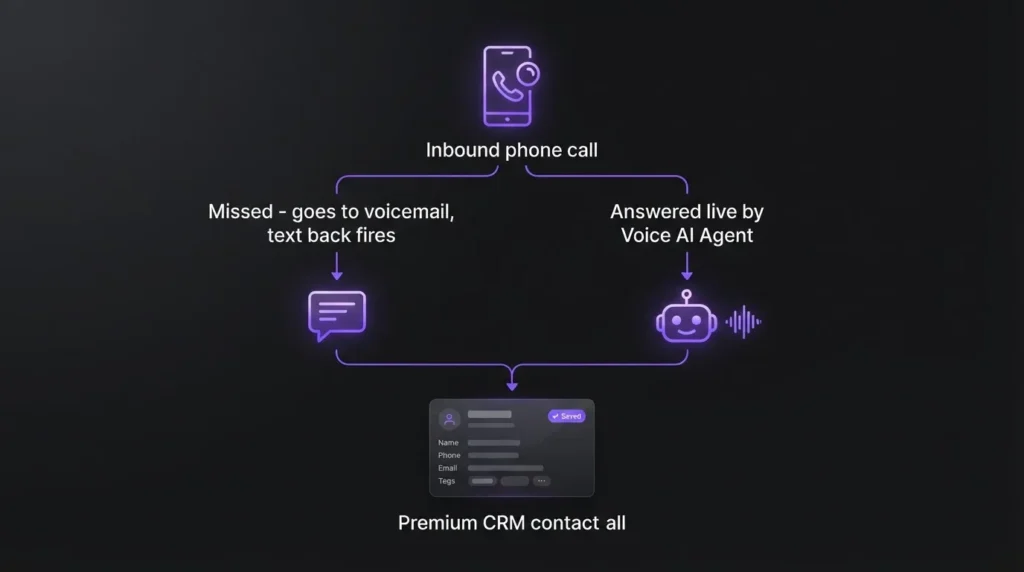
A few weeks ago we wrote about missed call text back: the caller reaches voicemail, a workflow fires, a text goes out asking how we can help. That post gets one follow up question more than any other. If a workflow can text a caller back in seconds, why not just let an AI answer the call itself?
We have spent the last few weeks testing GoHighLevel’s Voice AI Agents on two client sub-accounts, a home services business and a small clinic, the same kind of hands-on testing behind our honest read on GoHighLevel after building it for 100+ clients, and reading through the vendor documentation line by line before deciding anything for a client. Here is the honest answer: it can do more than most business owners expect, it fails in one specific way vendors do not lead with, and the decision to turn it on is not the same decision as turning on text back. Worth saying up front: GoHighLevel is part of our own service stack, so treat this as a builder’s read rather than a neutral one, and we will say plainly where it falls short.
What GoHighLevel’s Voice AI Actually Does on a Call
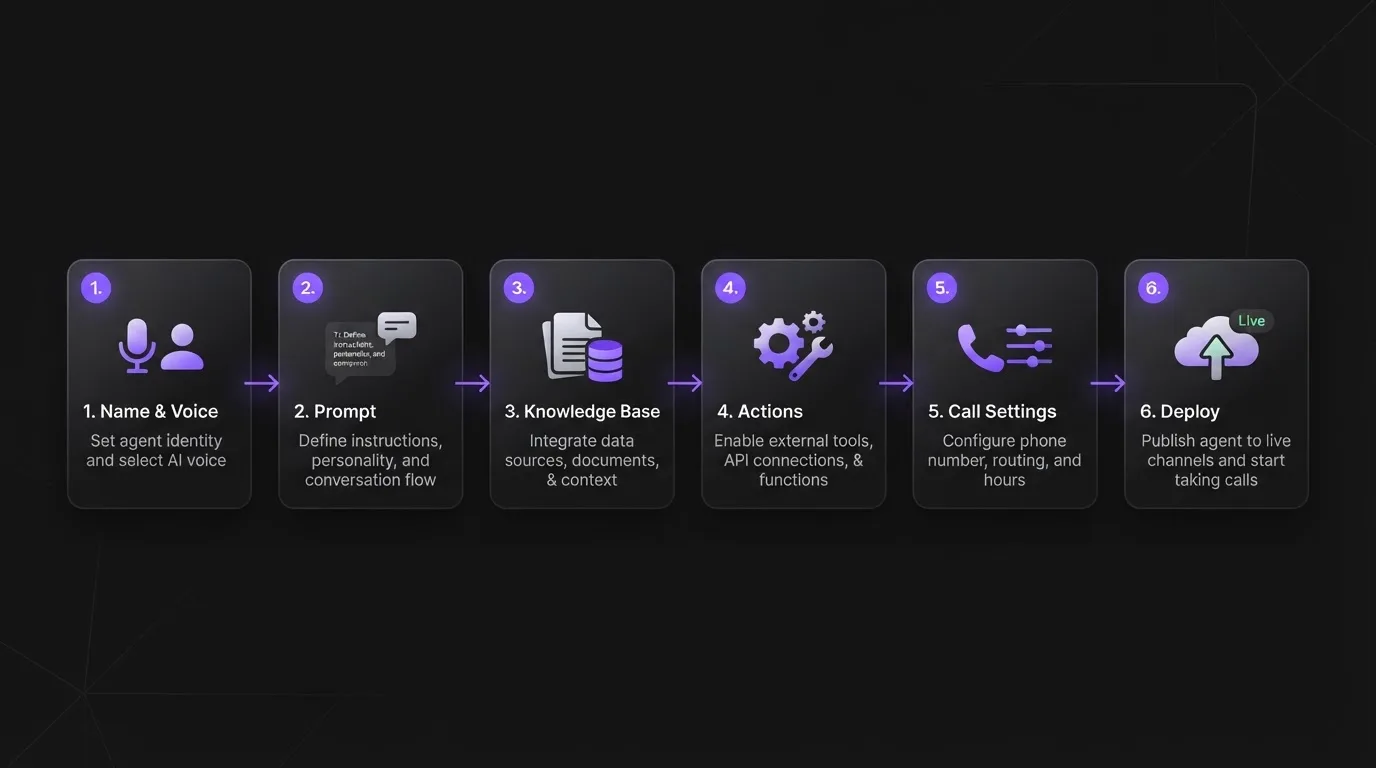
GoHighLevel’s own support documentation describes Voice AI Agents as software that can “answer calls, qualify leads, schedule appointments, provide information, and perform follow-up actions,” according to its overview of Voice AI Agents. That is not marketing copy from a reseller, that is the platform’s own support portal.
During a call, the agent collects details like name, email, and address and updates a CRM built around your process automatically. It can book directly into a calendar, transfer the call to a human based on rules you set, and trigger a workflow after the call ends, the same kind of workflow that already sends a follow up text in our published missed call setup. One requirement is easy to miss: Voice AI only works on accounts using LC Phone or Twilio numbers, so a business on a different phone provider inside GoHighLevel needs to switch numbers before any of this works.
Setup, per GoHighLevel’s own agent creation guide, runs through six pieces: naming the agent and picking a voice and language, writing a prompt that defines the role and escalation rules, connecting a knowledge base of business hours and pricing and policies, configuring actions like transfers and webhooks, tuning call settings like interruption handling and silence timeouts, then assigning phone numbers and working hours. None of that is a five minute toggle. It is closer to onboarding a new front desk hire, except the hire cannot ask you a clarifying question in the break room.
Do Callers Actually Mind Talking to an AI?
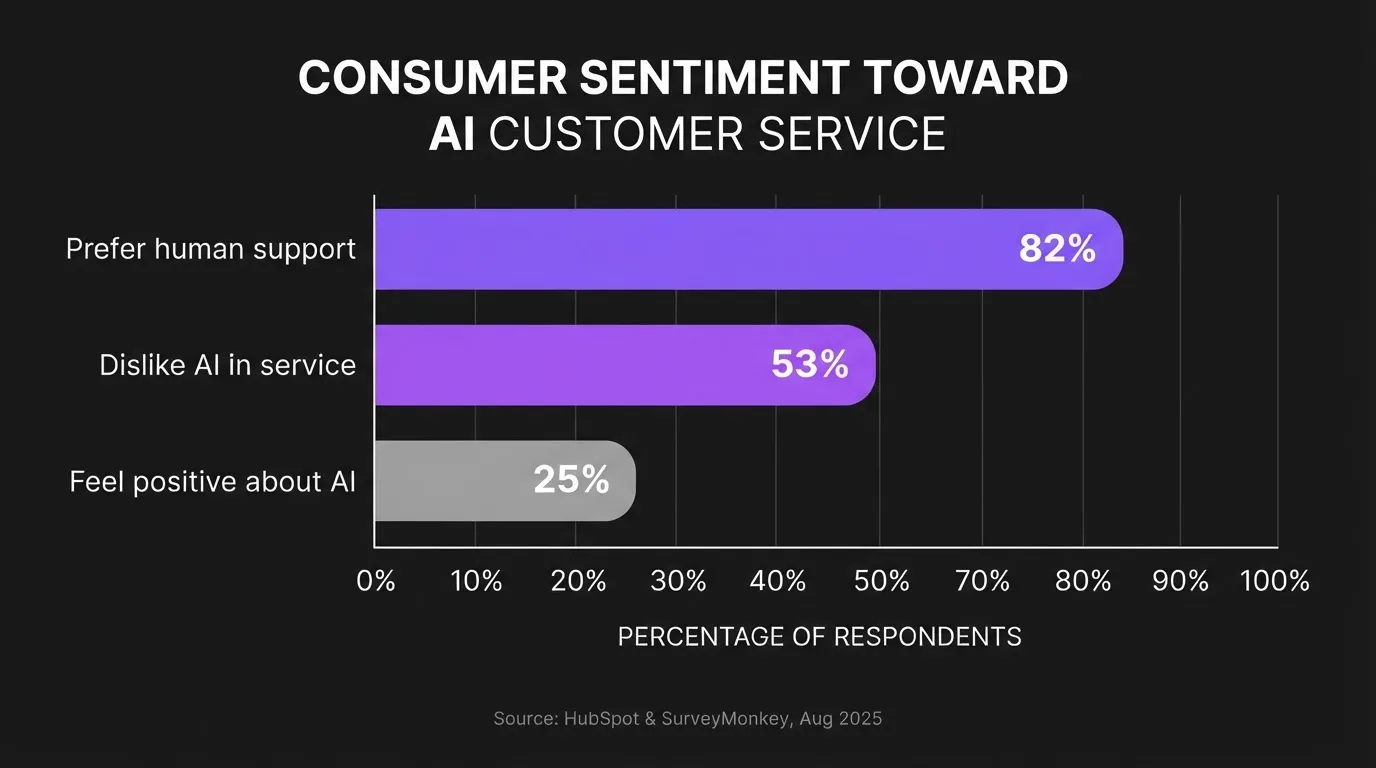
This is the part most vendor pages skip, and it is the part that should decide whether you turn this on at all. A HubSpot and SurveyMonkey report, based on a survey of 1,800 business leaders and 15,000 consumers across seven markets and released in August 2025, found that 82 percent of customers prefer human support even when wait times and outcomes are identical, and 53 percent said they actively dislike AI in service interactions. Only a quarter reported feeling positive about it. SurveyMonkey’s Zoe Padgett put it plainly: current AI applications “often fail to meet customer expectations for empathy, nuance and genuine connection.”
We are not citing that to talk you out of the feature. We are citing it because every AI phone agent listicle we found while researching this piece skipped straight to setup and cost, and none of them asked whether the caller on the other end wants this. A dental clinic in Quezon City fields a very different kind of call than a SaaS support line, and a nervous first time patient calling about a toothache is exactly the caller most likely to hang up on a bot and try a competitor instead.
What Breaks: The Setup Details Vendors Don’t Advertise
Three things surprised us running this on live client accounts.
First, the knowledge base is not optional and it is not forgiving. GoHighLevel’s own setup documentation states the agent should “not invent answers when required information is unavailable.” That is the right instruction, but it means every gap in your business’s documented pricing, policies, and hours becomes a gap in what the agent can tell a caller. We spent more time writing the knowledge base than we did configuring the agent itself.
Second, call transfer testing has a blind spot: the documentation notes that “call transfer does not run during a web call test,” meaning the escalation path you are counting on for the calls the AI cannot handle has to be tested on an actual phone call, not in the builder’s preview.
Third, if you plan to record or transcribe calls for quality review, which most Voice AI setups do by default, check your state’s consent law before switching it on. Eleven US states clearly require all parties on a call to consent to recording, and several more are treated as all party consent states in practice by compliant call centers, per a state by state breakdown of call recording consent laws. That list includes California, Florida, and Illinois, three states with a lot of small business callers. This is a different compliance question from the A2P 10DLC and quiet hours rules we covered for text back, and it applies the moment a call gets recorded, not just when a text goes out.
Voice Agent or Text Back: Which Should You Turn On First?
If you have not built the text back workflow yet, build that first. It costs less, callers do not have to notice anything is automated until they read the text, and it already recovers the leads that go silent the moment a call is missed. That is still the highest return per hour of setup we have found for a business with under a few hundred contacts, and it is a smaller first step into the automation layer than a full voice agent is.
This is also the exact scoped-deployment test we laid out in our piece on AI sales agent readiness: start with a limited task, not a full conversation, and only expand once someone owns reviewing what the agent does.
Turn on the Voice AI Agent when you are past that stage and a specific pattern shows up in your call logs: a high volume of after hours calls asking the same handful of questions (hours, pricing, availability), where a caller who hangs up on a bot was probably going to hang up on hold anyway. That is a real gap the agent fills well, because the alternative for that caller was never a human, it was voicemail.
Do not turn it on as the front door for every inbound call if your business depends on a caller feeling reassured in the first ten seconds, the way a clinic, a funeral home, or an urgent home repair business does. The backlash data above is not evenly distributed. A caller who is stressed wants a person more than a caller who just wants your Saturday hours.
We Would Like to Hear From You
If you have turned on an AI voice agent for inbound calls, we want to know what your escalation rate looks like, meaning how often it hands off to a human versus completes the call on its own. We have not run this long enough on enough accounts to call that number a pattern yet, and we would rather compare notes than publish a guess.
If you are trying to decide whether text back or a full voice agent is the right next step for your call volume, book a strategy call. We will look at your actual call logs before recommending either one.
Frequently asked questions
Yes, according to the data available. A HubSpot and SurveyMonkey report from August 2025 found 82 percent of surveyed customers prefer human support even when the wait time and outcome are identical, and 53 percent said they actively dislike AI in service interactions. Preference varies by situation, a routine question tolerates it better than an urgent one.
Yes. GoHighLevel’s own documentation lists appointment booking as a configurable action the agent can trigger mid call, alongside updating contact fields, sending SMS, and transferring to a human. It requires the calendar and the action to be set up correctly during agent creation, it is not automatic out of the box.
GoHighLevel’s setup guidance instructs the agent not to invent answers when information is missing from its connected knowledge base. In practice that means the agent should escalate or say it does not know rather than guess, which is why the knowledge base has to be built out fully before launch, not left thin.
It depends on the state the caller is in. Eleven US states, including California, Florida, and Illinois, are commonly treated as requiring all party consent to record a call, and a few more are handled the same way as a precaution. Check your state’s rule and your Voice AI platform’s recording settings before enabling call recording or transcription.
Text back first, for most small businesses. It is cheaper to set up, recovers leads from calls that already went to voicemail, and does not put an AI in front of every caller. A Voice AI Agent makes more sense once your call logs show a clear pattern of repetitive after hours questions that a knowledge base can answer reliably.