Our Work
Digital Marketing, SEO & AI Automation Case Studies
Real CRM workflows, integrations, websites, tracking fixes, and a Google Ads recovery, with screenshots.
Selected Work
Systems, Workflows and Campaigns We Have Built
Every project below shows the real build: the platform it runs on, what it does, and what you are looking at in the screenshot. Select any screenshot to view it full size. Client names, contact details and account identifiers are removed or blurred to protect client confidentiality.
- GoHighLevel and CRM4 CRM systemsWorkflows, pipelines, AI calling, event automation
- Make3 integrationsBullhorn CRM, OpenAI live chat, Outlook to ServiceM8
- Zapier6 ZapsLead enrichment, routing, follow-up, content
- SEO2 tracking snapshotsKeyword positions across 200 tracked terms
- Websites2 website buildsWordPress and Elementor, GoHighLevel AI Studio
- Google Ads1 case studyAccount-level delivery issue, diagnosed and fixed
Automation and CRM
GoHighLevel CRM Workflows and Pipelines
Most of our CRM work happens inside GoHighLevel: workflows that capture leads, update opportunities, notify the team, and keep follow-up moving without anyone having to remember it. These four builds each show a different part of that job, and they are the core of our CRM and GoHighLevel services.
AI calling and pipeline automation
AI Outbound Call Flow and Data Reactivation Pipeline
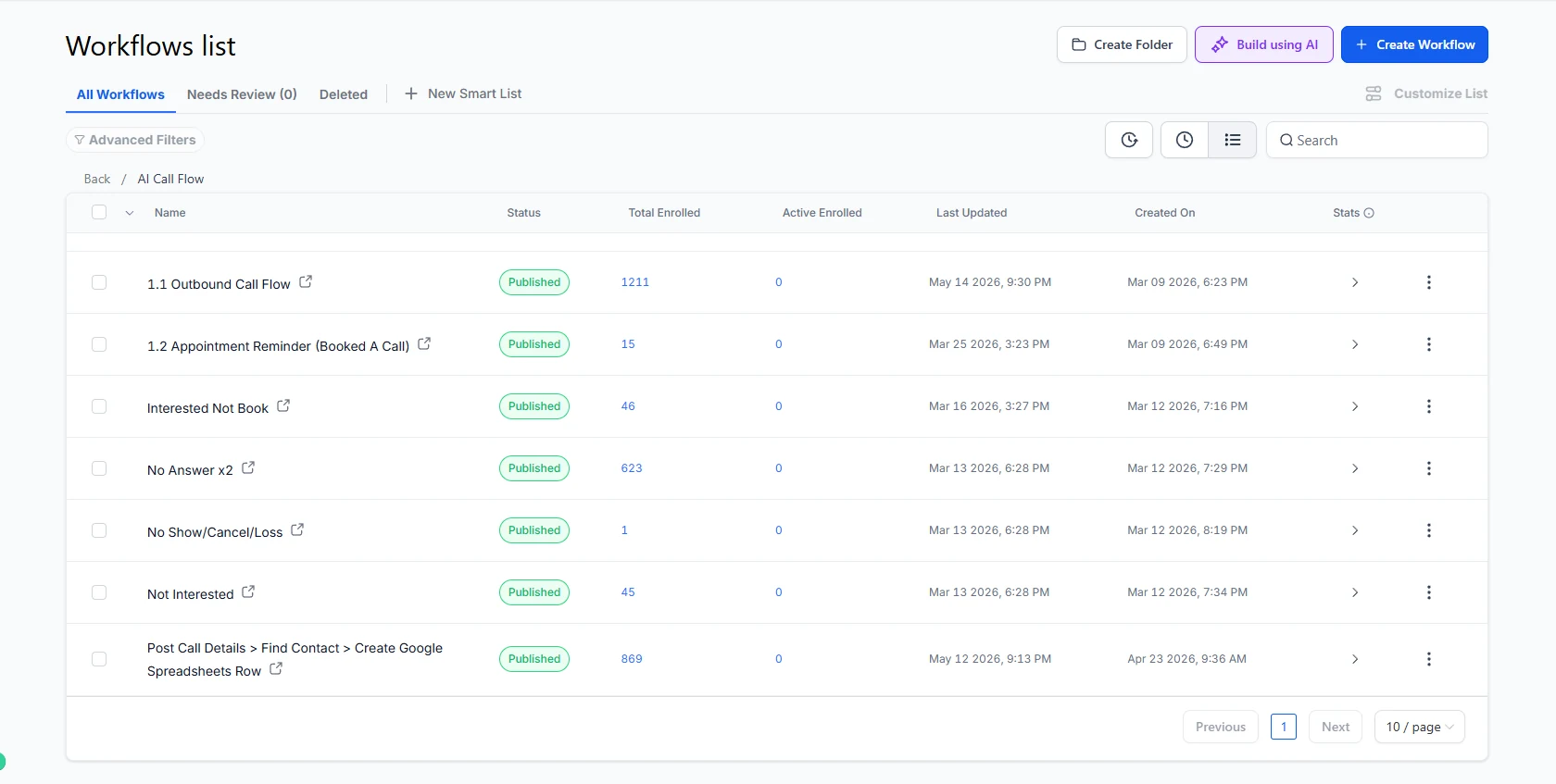
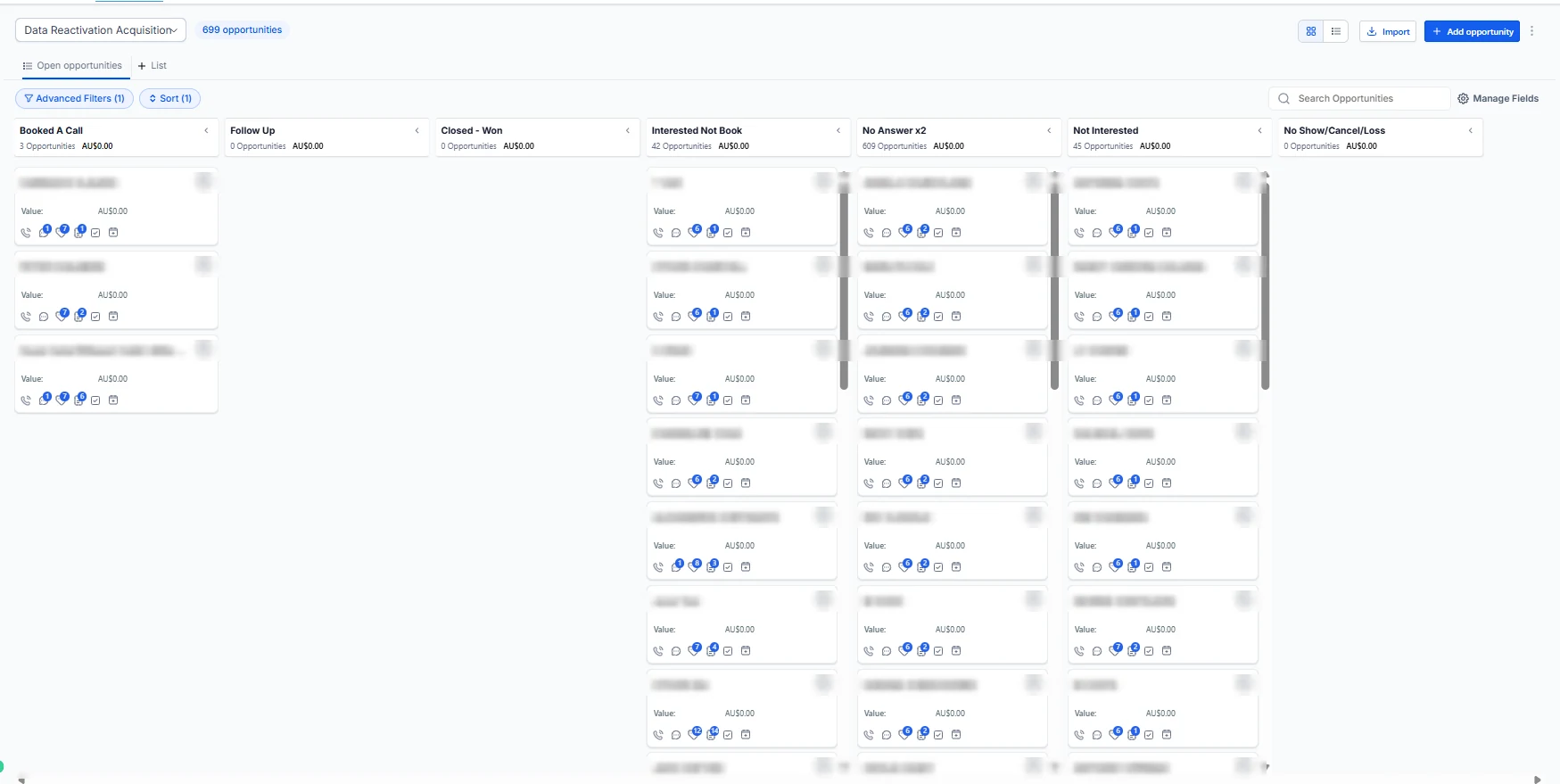
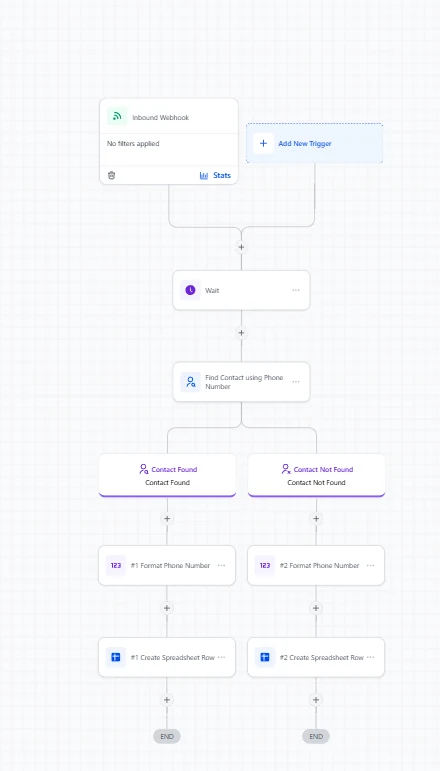
A GoHighLevel build for an AI calling campaign that worked through an existing contact database. Each call outcome has its own workflow: the contact moves to the matching pipeline stage, gets the right follow-up, and post-call details are logged to Google Sheets through a webhook.
- 1,211contacts enrolled in the outbound call flow
- 699opportunities in the reactivation pipeline
- 869enrollments in the post-call logging workflow
Figures as shown in the workflow and pipeline screenshots.
- GoHighLevel
- AI calling
- Pipelines
- Webhooks
- Google Sheets
Events, payments and email
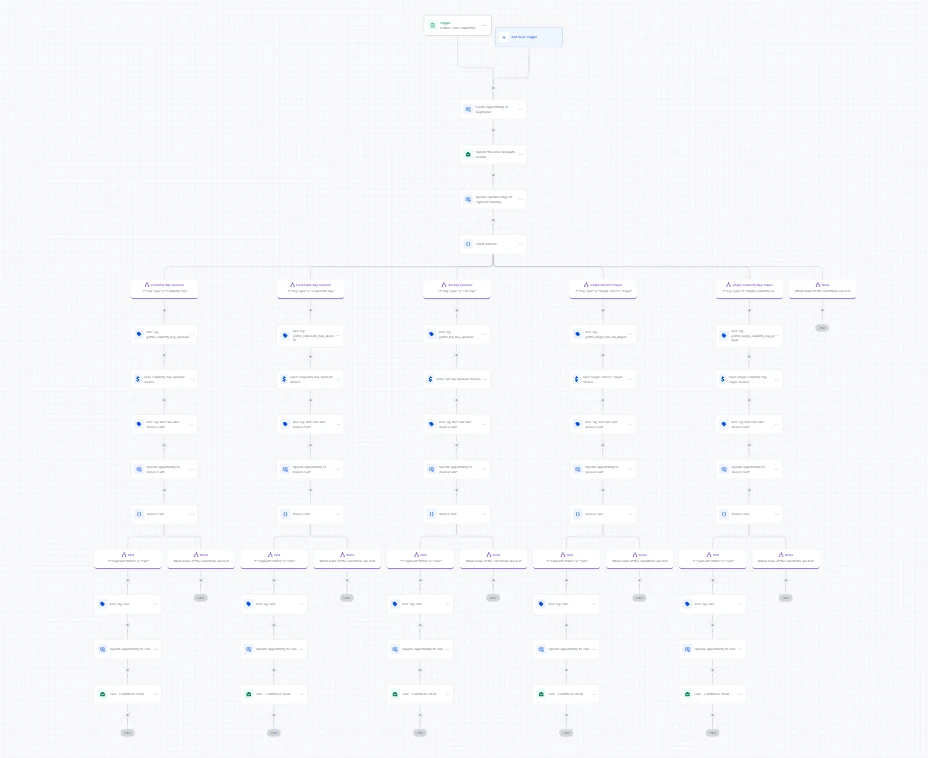
Event Registration, Partner and Countdown Automation
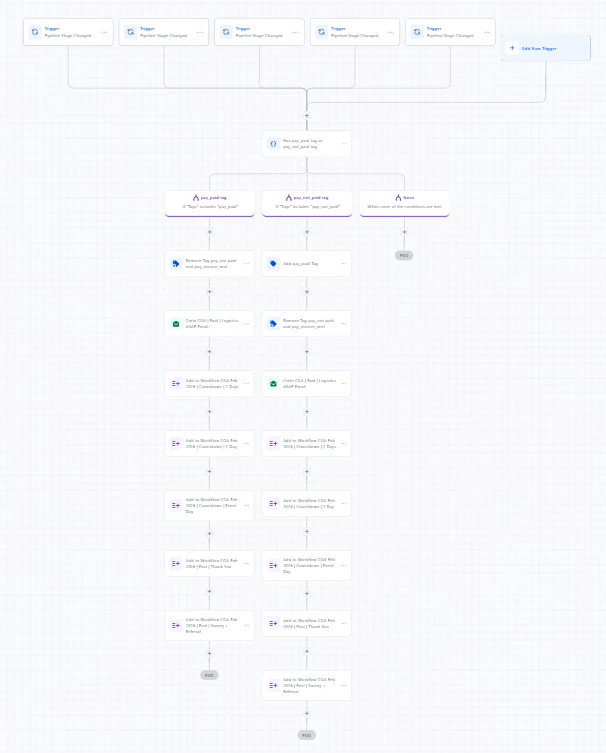
A connected set of workflows for an event. Registrations branch by sponsorship or player type, each with its own invoice and payment check. Once an attendee is marked paid, they get logistics details and a countdown sequence at 7 days, 1 day and on event day, followed by a post-event survey and referral email.
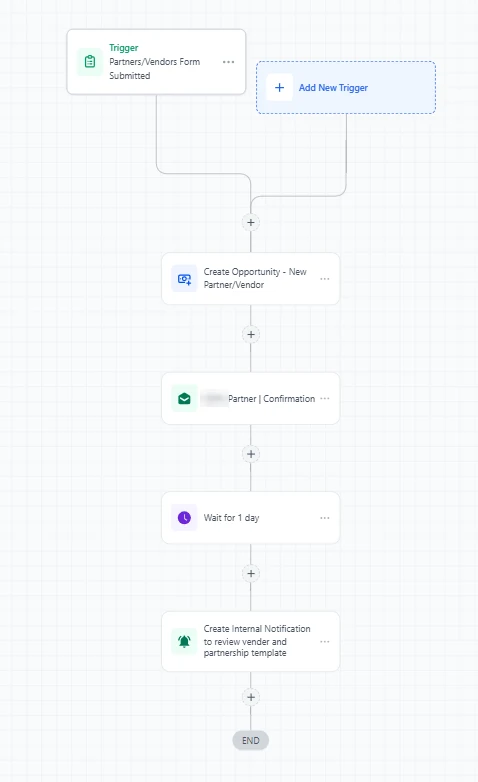
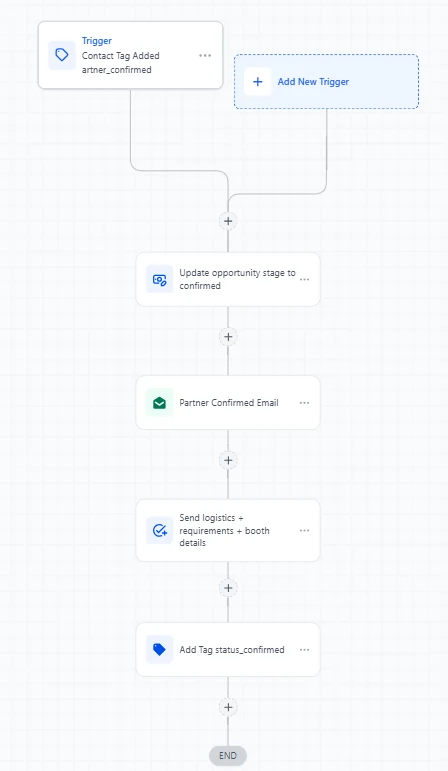
Partner and vendor applications run on a separate track. The team gets a reminder to review each application, and one approve or decline tag updates the pipeline and sends the matching email.
- GoHighLevel
- Pipelines
- Invoices
- Tag triggers
- Email sequences
Lead capture and routing
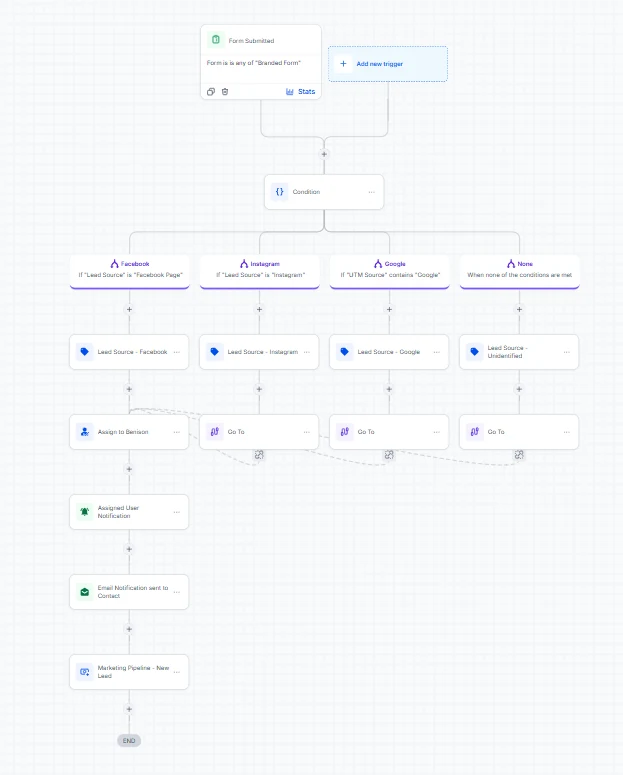
Lead Source Tracking, Assignment and Pipeline Entry
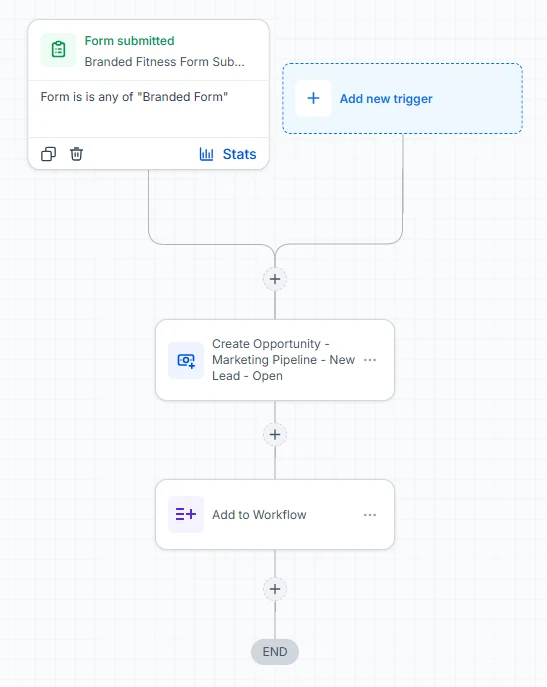
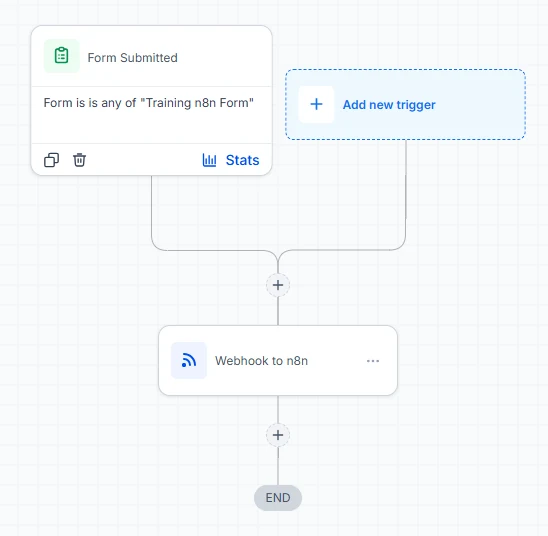
Every form submission is checked for its source (Facebook, Instagram or Google) and tagged, so reporting shows where leads actually came from. The lead is assigned to a team member, the assigned user and the contact are both notified, and an opportunity opens in the marketing pipeline. One variation hands the form data to n8n by webhook for processing outside the CRM.
- GoHighLevel
- Lead source tags
- User assignment
- n8n
Appointments and nurture
Appointment Reminders and Networking Follow-Up
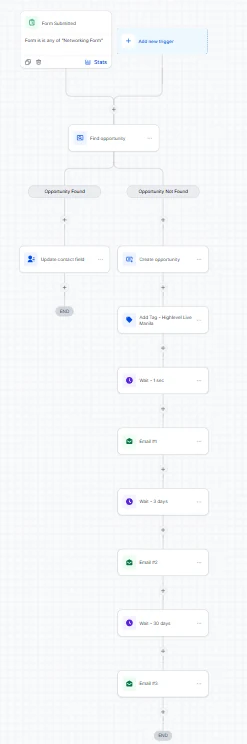
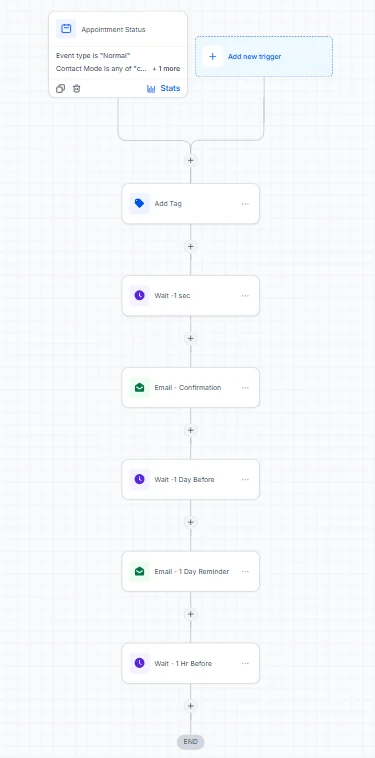
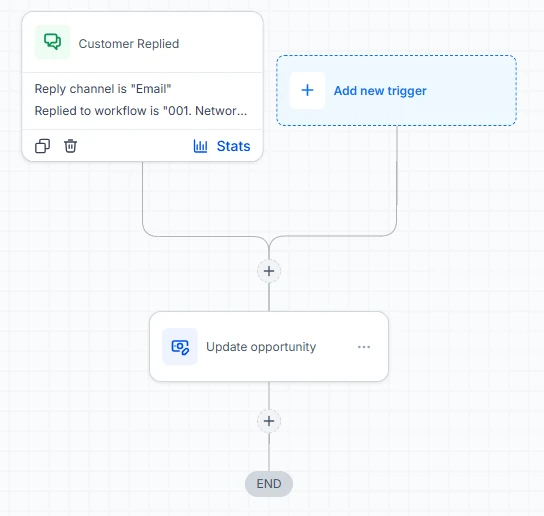
Booked appointments get a confirmation email and a reminder the day before. Contacts from a networking form are matched to an existing opportunity or given a new one, then receive three emails spread over about a month. When someone replies by email, their opportunity updates on its own, so the pipeline stays current without anyone watching the inbox.
- GoHighLevel
- Calendars
- Email nurture
- Reply triggers
Make
Make Scenarios That Connect Business Platforms
When a process spans tools that do not talk to each other natively, we build the bridge in Make. Each scenario below moves data between platforms that someone would otherwise copy across by hand. Integrations like these are part of our AI and automation services.
CRM integration
Bullhorn CRM to GoHighLevel Contact Sync
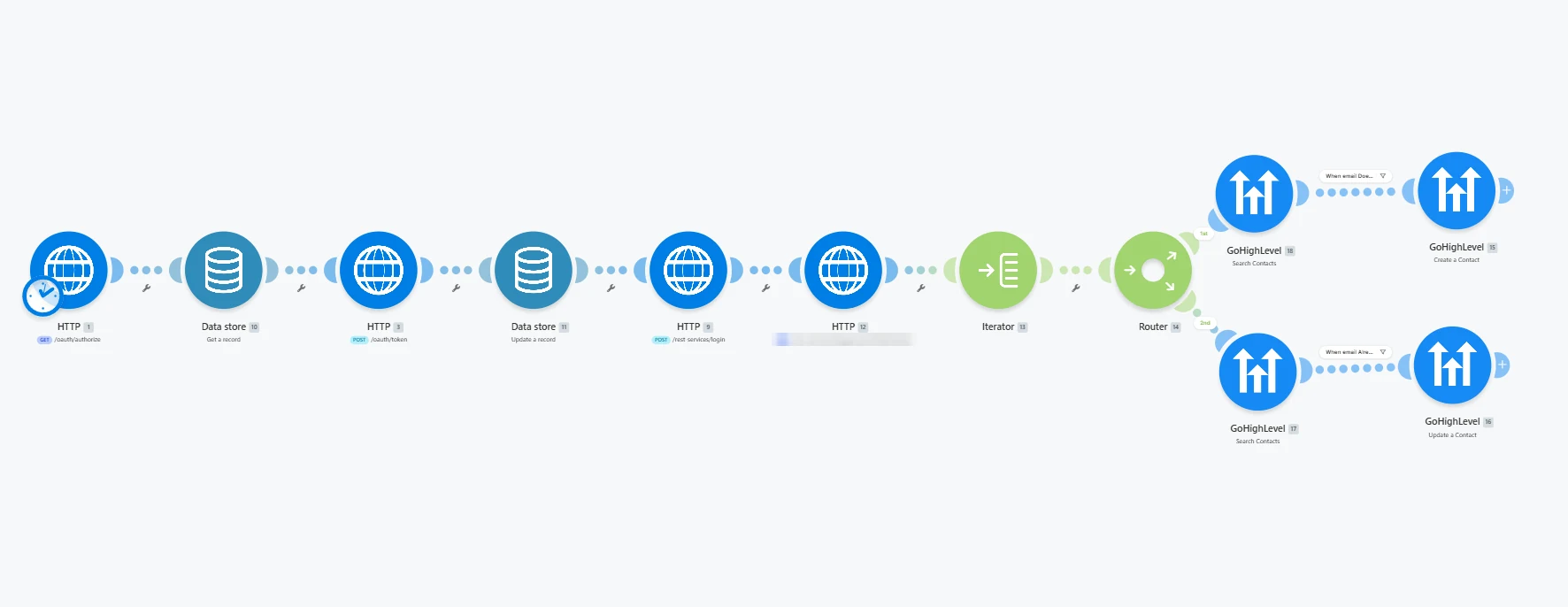
Runs on a schedule, authenticates with Bullhorn and pulls client contacts. Each contact is searched in GoHighLevel by email: new contacts are created and existing ones are updated. Access tokens are stored and refreshed in a Make data store.
- Make
- Bullhorn CRM
- GoHighLevel
AI chat automation
AI Replies for GoHighLevel Live Chat
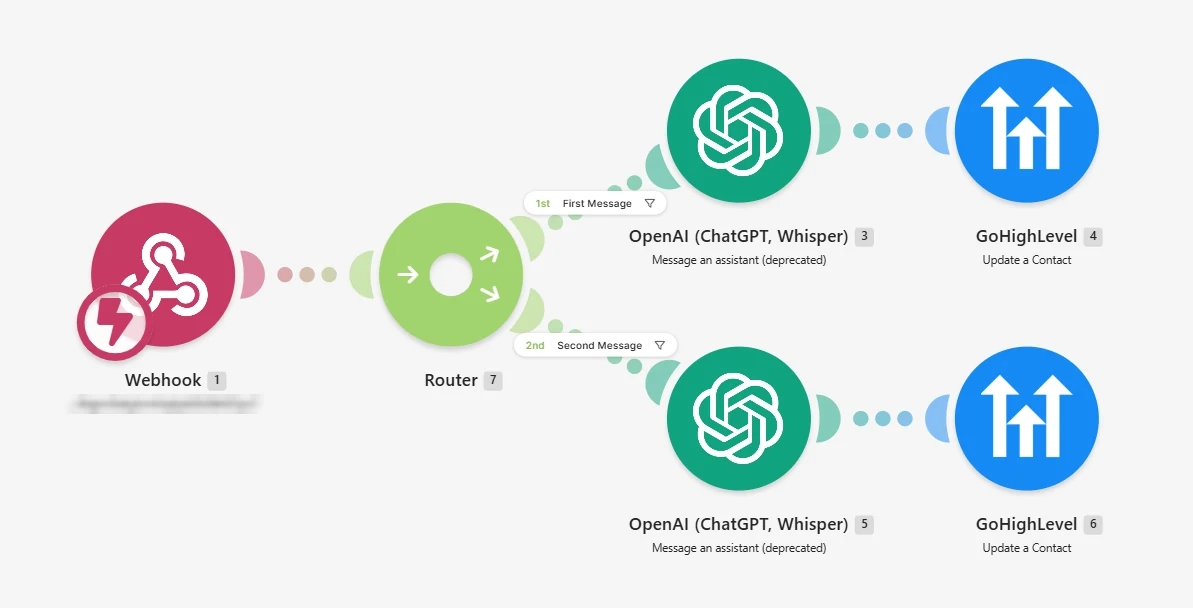
A webhook receives live chat messages from GoHighLevel. A router separates first messages from follow-ups, each path sends the message to an OpenAI assistant, and the response is written back to the contact in GoHighLevel.
- Make
- OpenAI
- GoHighLevel
Email to job automation
Outlook Emails to ServiceM8 Jobs
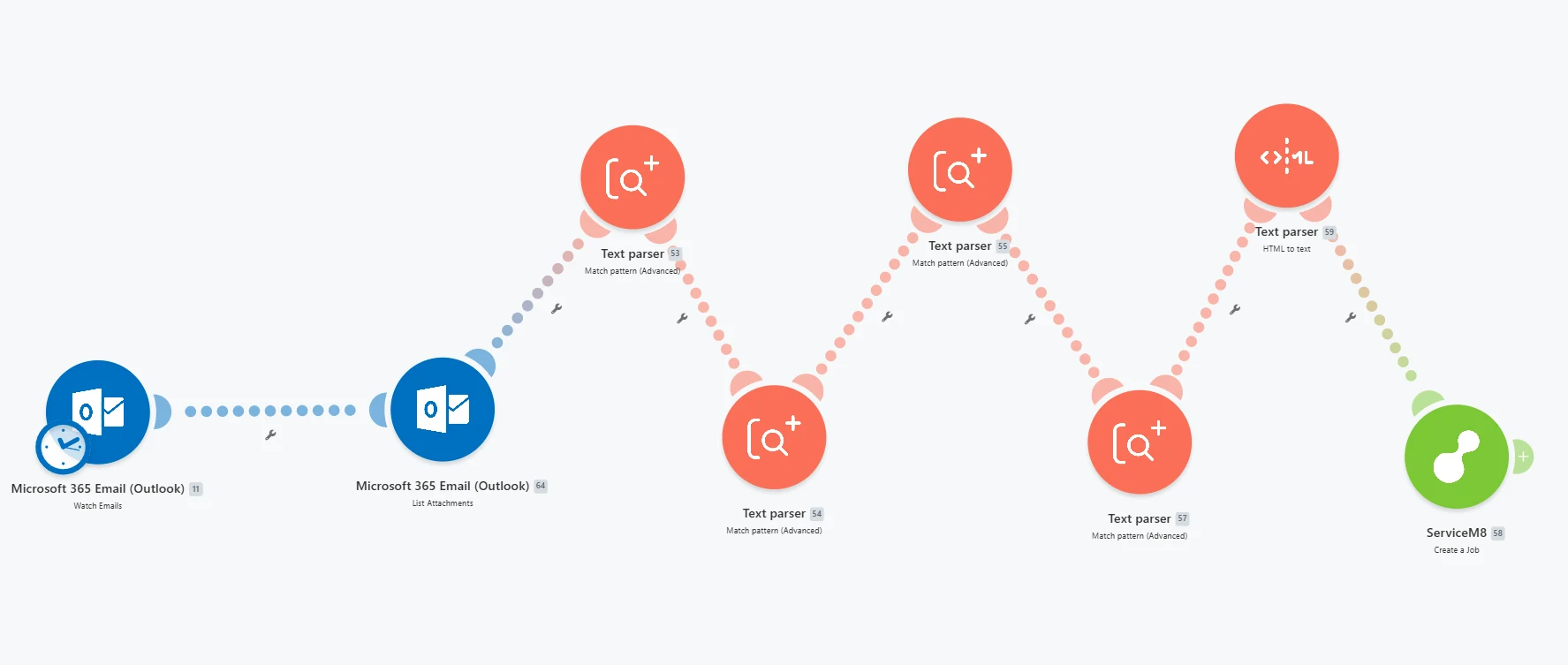
Watches a Microsoft 365 Outlook inbox and reads each email and its attachments. Text parsers pull out the job details and convert the HTML to plain text, then the scenario creates the job in ServiceM8 without anyone retyping it.
- Make
- Microsoft 365 Outlook
- ServiceM8
Zapier
Zapier Automations for Leads, Follow-Up and Content
Zapier suits teams that already work in Asana, HubSpot, Slack and Gmail. These Zaps take over the repetitive parts of the week: enriching and routing new leads, alerting the right person, following up on quotes, and turning one video into several posts.
Automated Lead Enrichment and Priority Routing
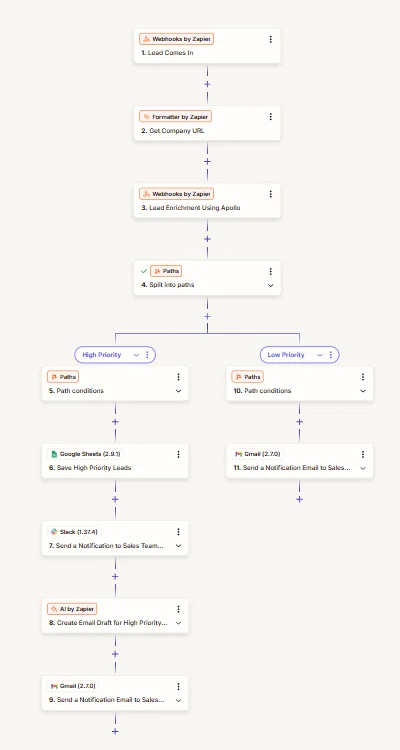
New leads arrive by webhook. The Zap extracts the company domain, enriches the lead through Apollo and splits it by priority. High-priority leads are saved to Google Sheets, posted to the sales team in Slack and given an AI-drafted email; lower-priority leads trigger an email notification.
- Zapier
- Apollo
- Slack
- Google Sheets
- Gmail
Form Notifications Routed to Sales or Customer Success
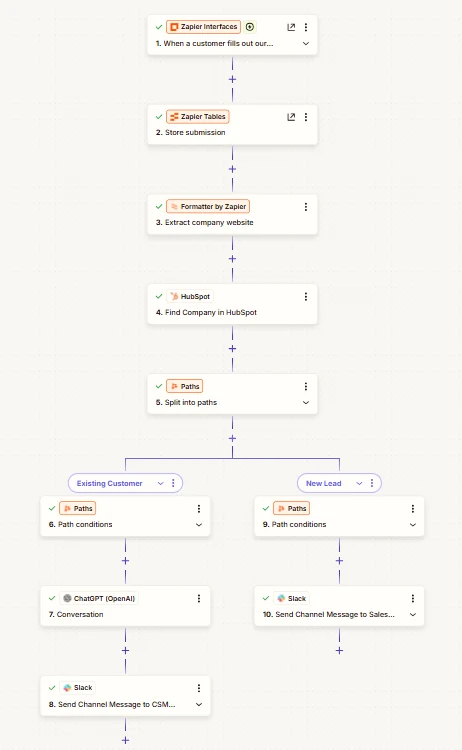
Form submissions are stored in Zapier Tables and the company website is checked against HubSpot. Existing customers go to customer success in Slack after a ChatGPT step; new leads go straight to the sales channel.
- Zapier Interfaces
- Zapier Tables
- HubSpot
- ChatGPT
- Slack
Lead Status Actions From Asana
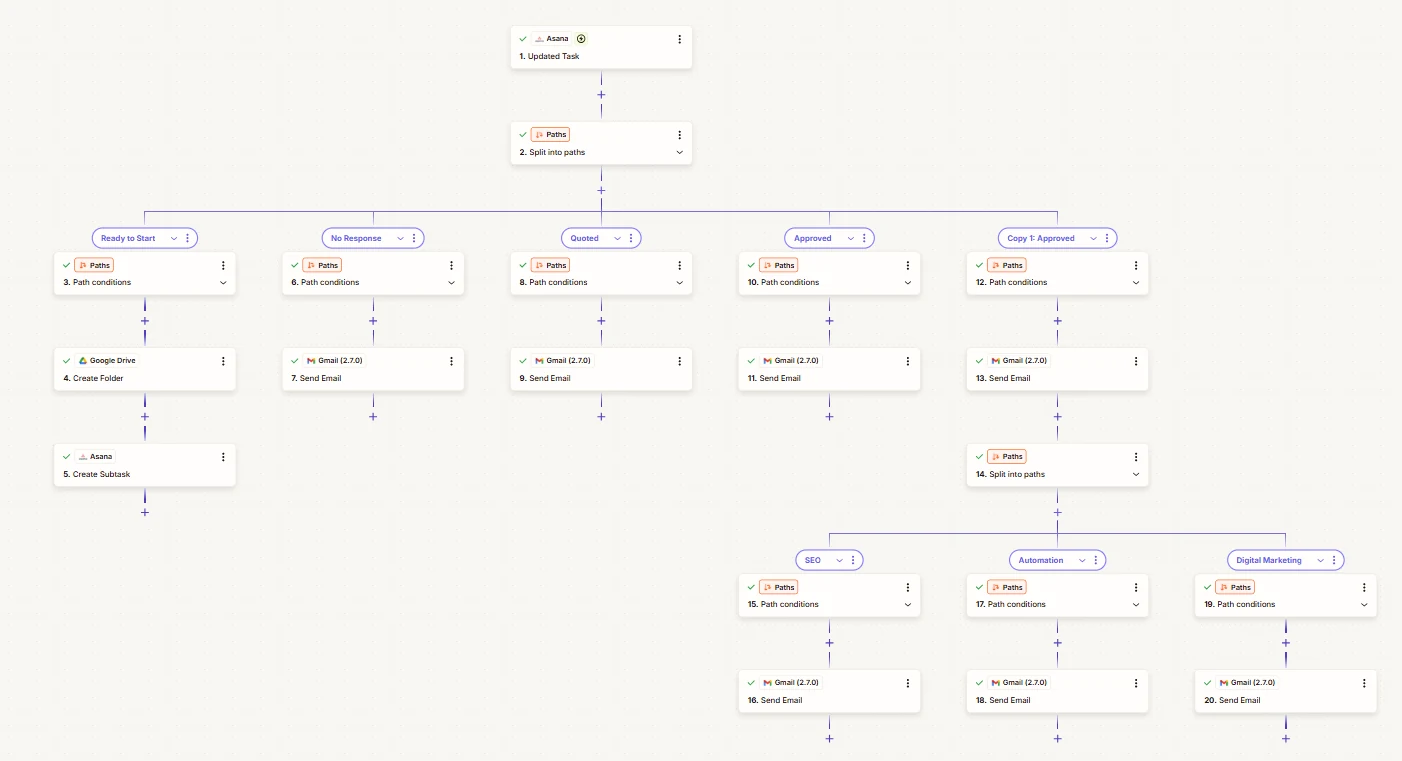
Whenever a lead task is updated in Asana, the Zap checks its status. Ready to Start creates a Google Drive folder and an Asana subtask. No Response, Quoted and Approved each send their own email, and approved leads get a message specific to SEO, automation or digital marketing.
- Zapier
- Asana
- Google Drive
- Gmail
AI Content Repurposing From Video
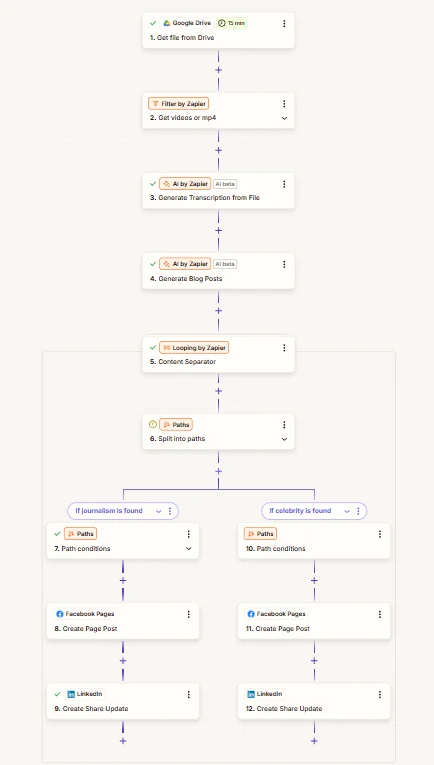
New videos in Google Drive are transcribed and turned into written posts with AI by Zapier. The output is split into individual pieces and published to Facebook Pages and LinkedIn, with the path chosen by topic.
- Zapier
- AI by Zapier
- Google Drive
- Facebook Pages
Weekly Quote Follow-Up
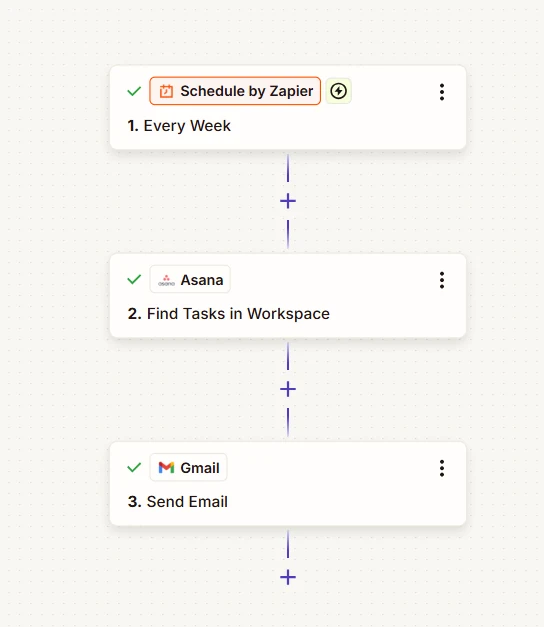
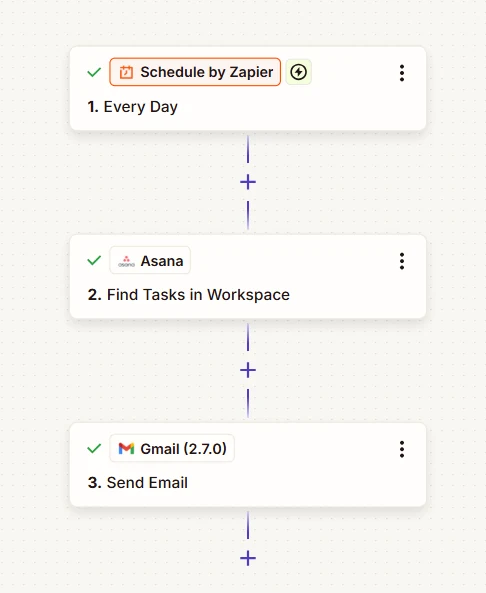
Once a week, the Zap finds the relevant quote tasks in Asana and sends follow-up emails through Gmail, so open quotes are chased on a schedule instead of from memory.
- Zapier
- Schedule
- Asana
- Gmail
SEO
SEO and Organic Search Tracking
We track keyword positions for the sites we work on, so progress is measured rather than guessed. These are two snapshots from October 2024 position-tracking reports, each covering 100 keywords tracked in the United States. Search volumes are the tracking tool’s estimates. Read more about our SEO services.
Education and wellness
Yoga Teacher Training Institute
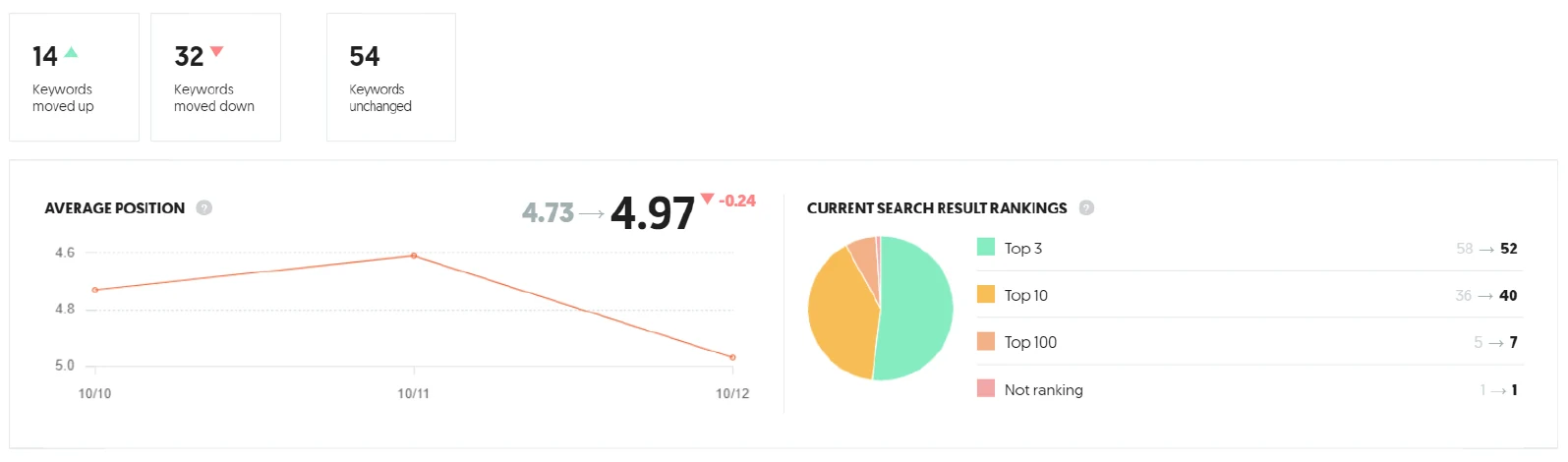
- 52keywords in the top 3
- 92keywords in the top 10
- 4.97average position
A mix of brand, program and informational keywords. Several topic keywords with an estimated 33,100 monthly searches held positions 2 to 4 in this snapshot. The same report shows 14 keywords moving up and 32 moving down over the tracked days, which is why we judge SEO on trends over months, not on a single week.
- Position tracking
- Informational content
- Brand keywords
Retail and ecommerce
Tile Retailer
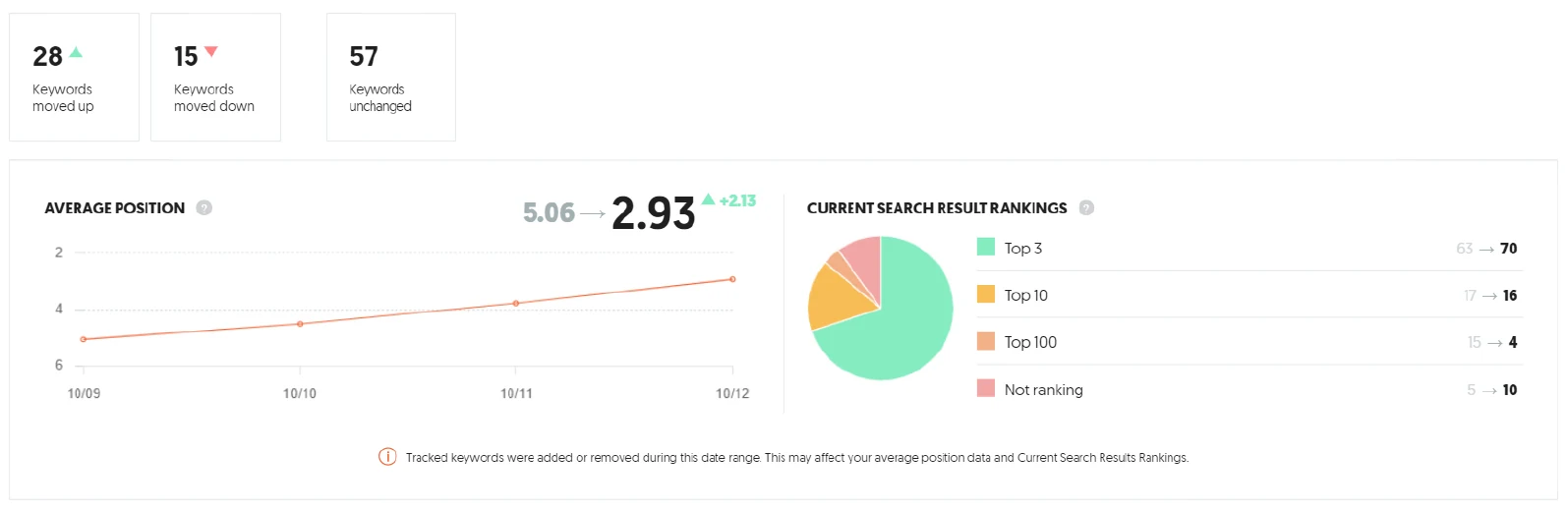
- 70keywords in the top 3
- 86keywords in the top 10
- 28keywords moved up
Product category and collection keywords for a tile brand. During the tracked period, kitchen wall tile terms with an estimated 8,100 monthly searches each reached position 2, including one that climbed from position 18. The tool notes that keywords were added during this period, so we do not quote its average-position change as a result.
- Position tracking
- Category pages
- Ecommerce SEO
Websites
Website Design and Development
We build service-business websites where the homepage has one job: get the visitor to book or call. The platform follows the client: WordPress with Elementor when they want full control of the site, GoHighLevel AI Studio when it should sit right next to their CRM. Both builds below come from our web development services.
GoHighLevel AI Studio website
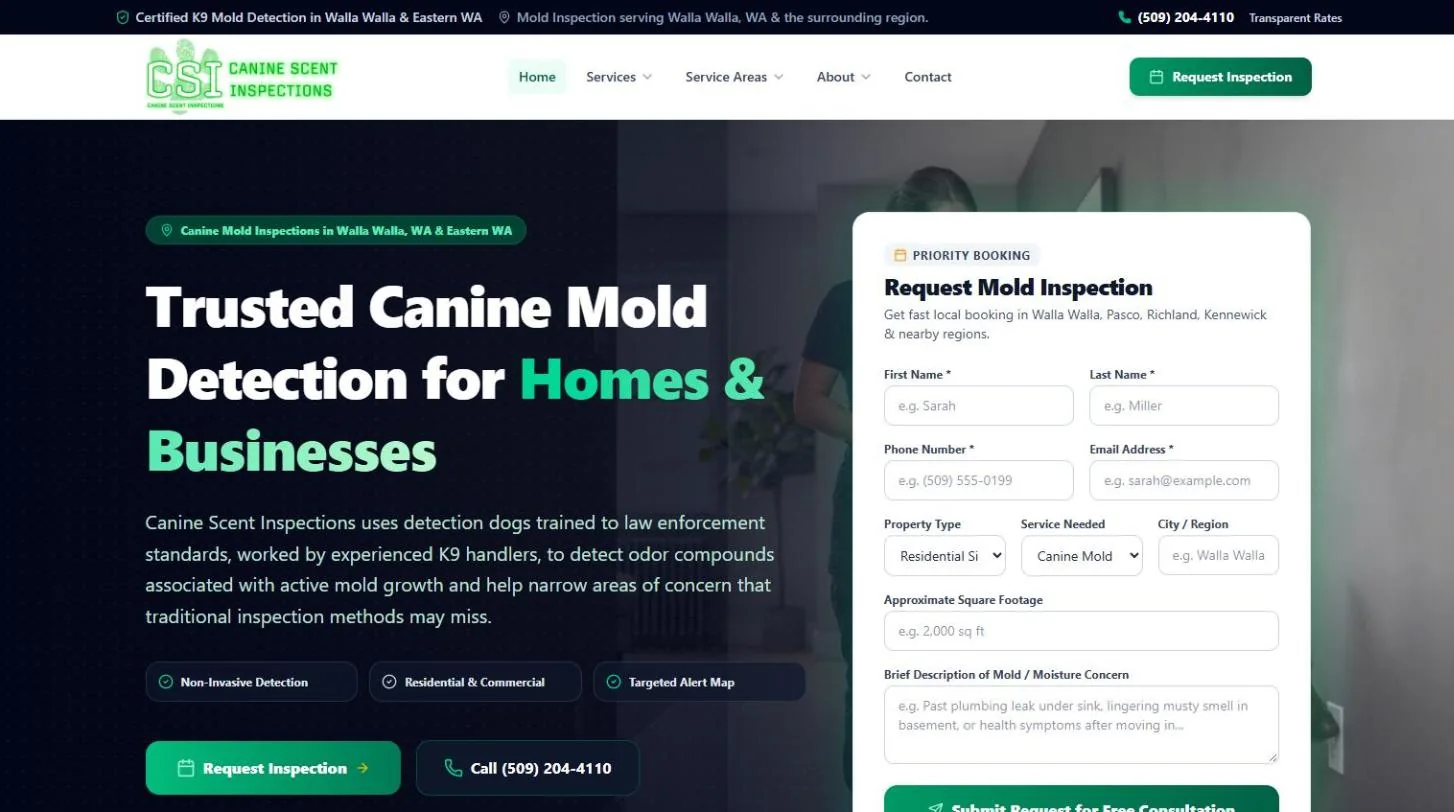
Canine Scent Inspections
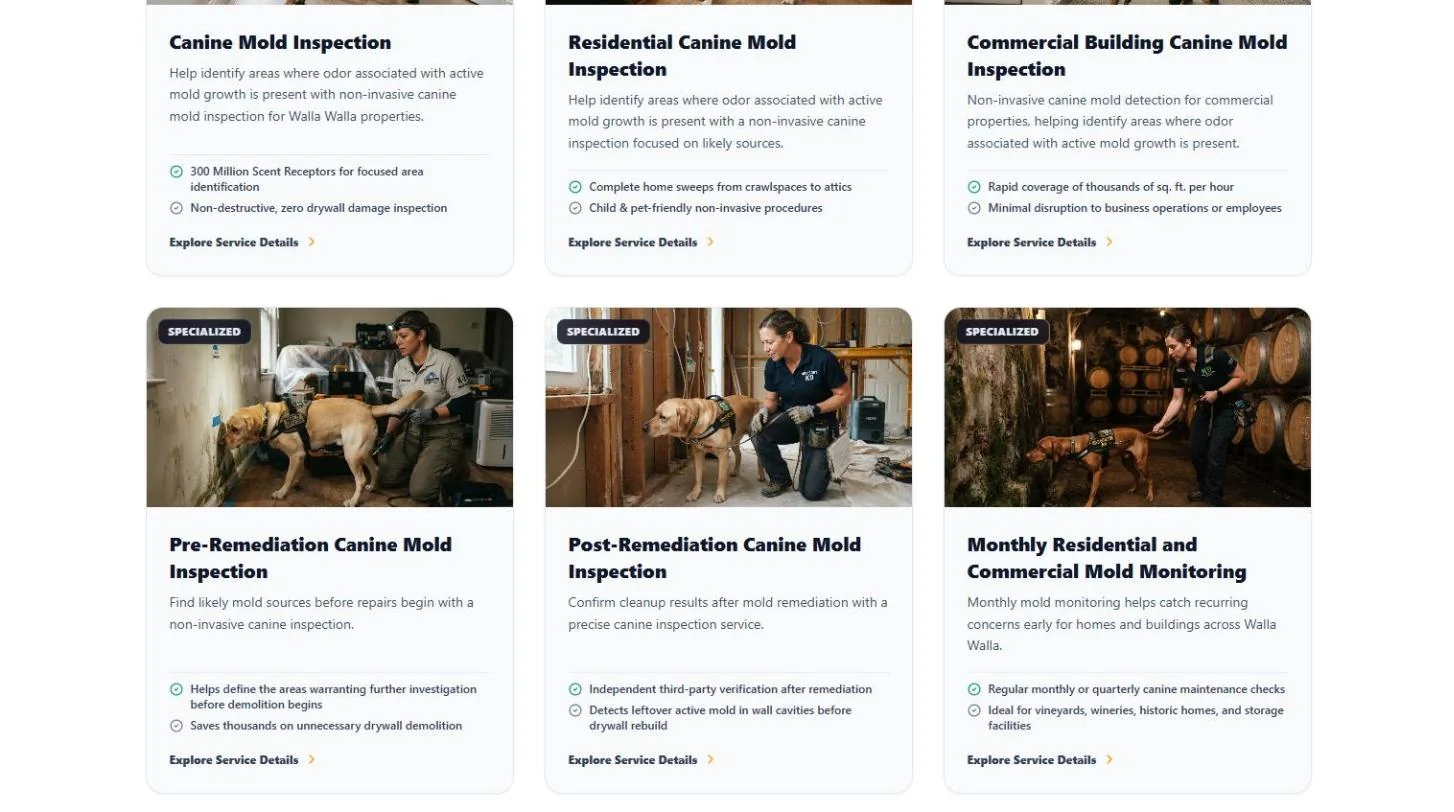
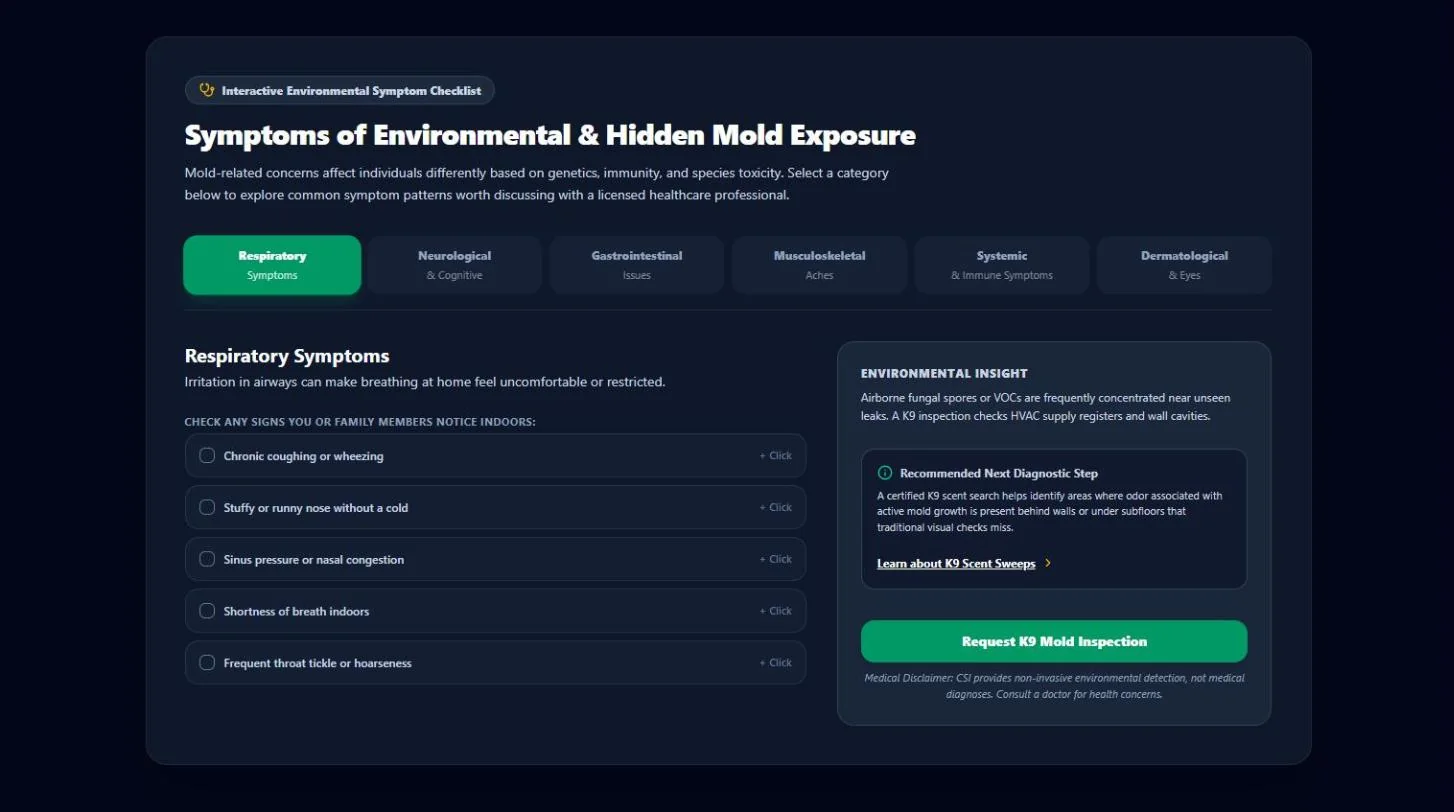
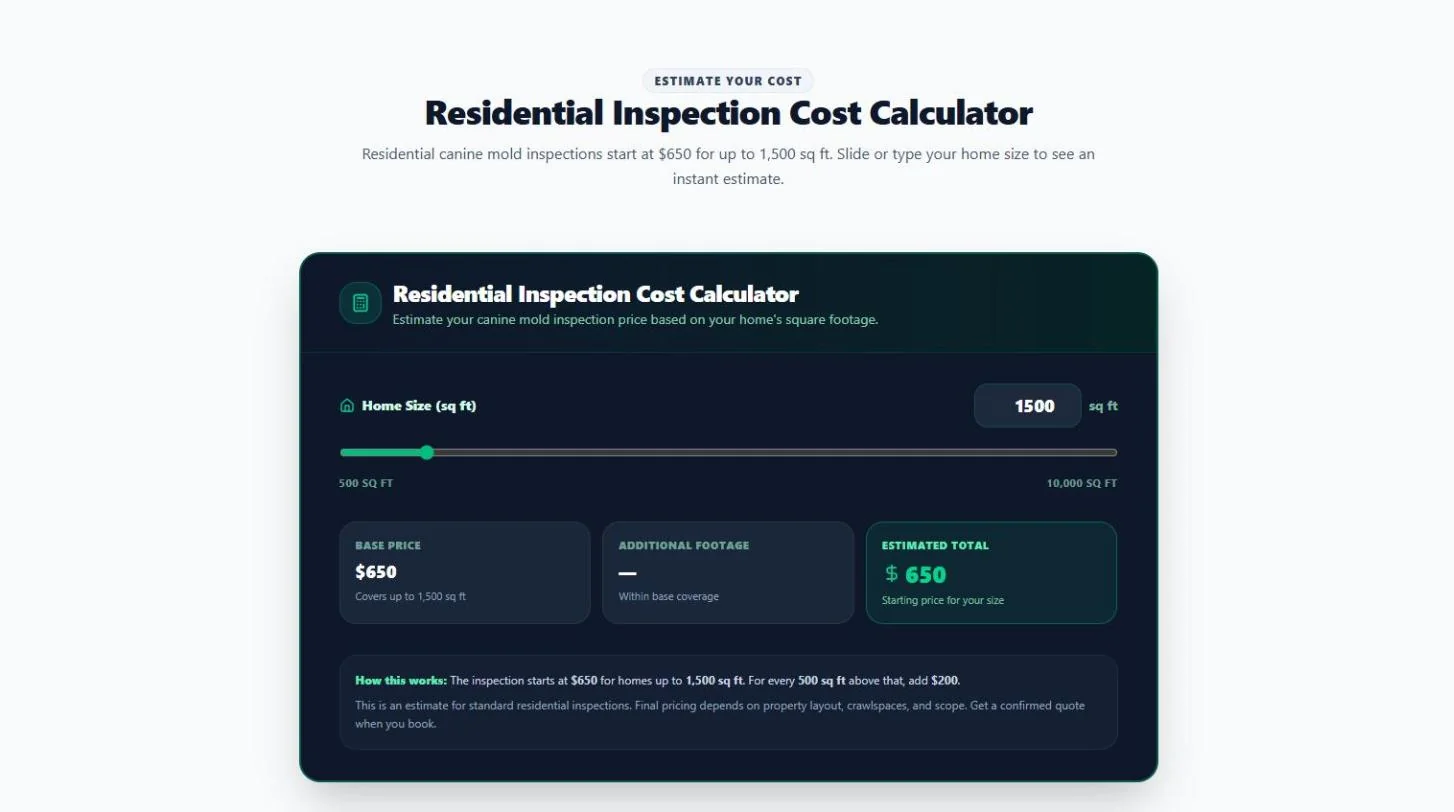
A website for a canine mold detection company serving Walla Walla and Eastern Washington, built in GoHighLevel AI Studio. The homepage puts the inspection request form in the hero, then backs it up with a service grid, an interactive symptom checklist, a service-area section and a residential cost calculator that gives visitors a price before they call.
- GoHighLevel AI Studio
- Local business website
- Lead capture form
- Interactive tools
WordPress and Elementor website
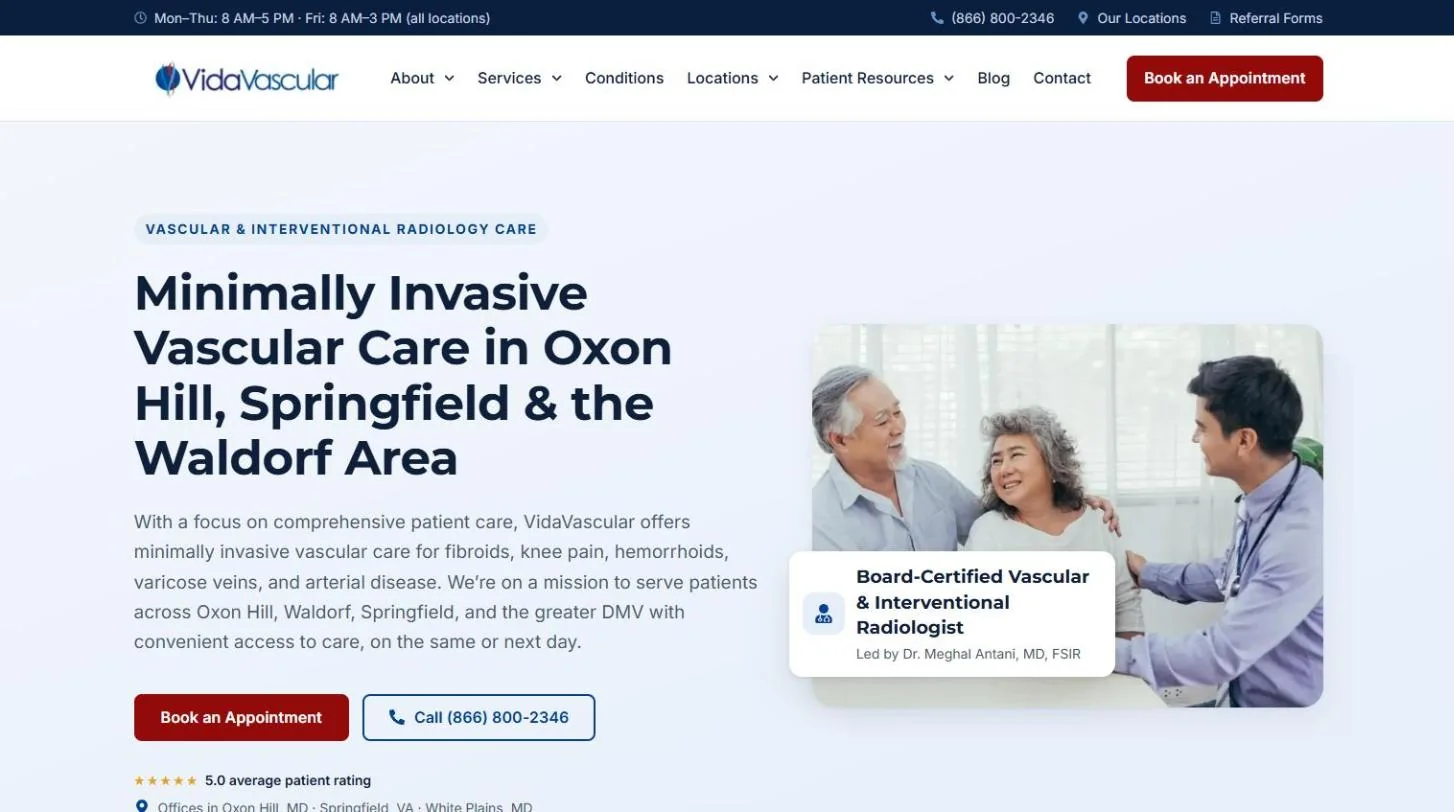
VidaVascular
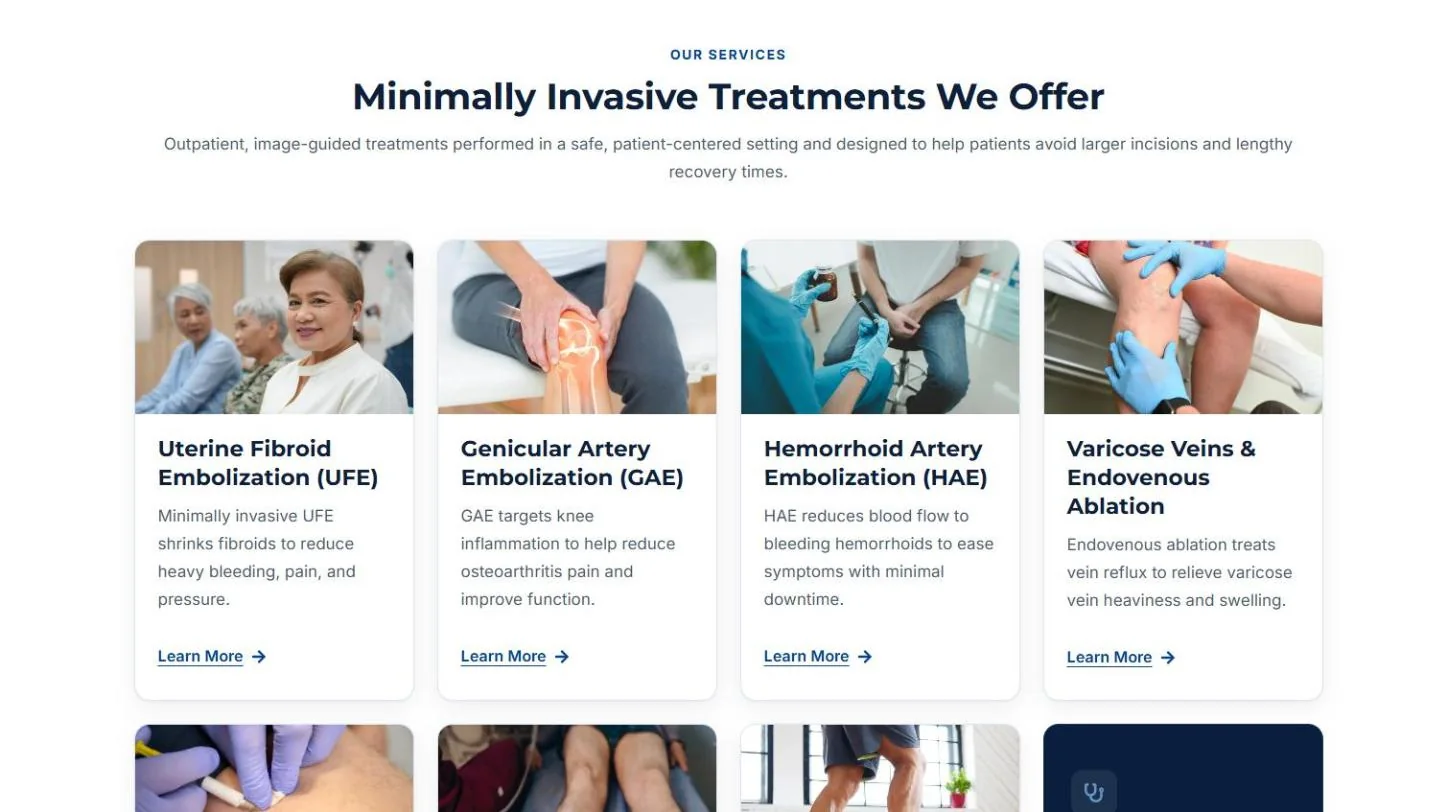
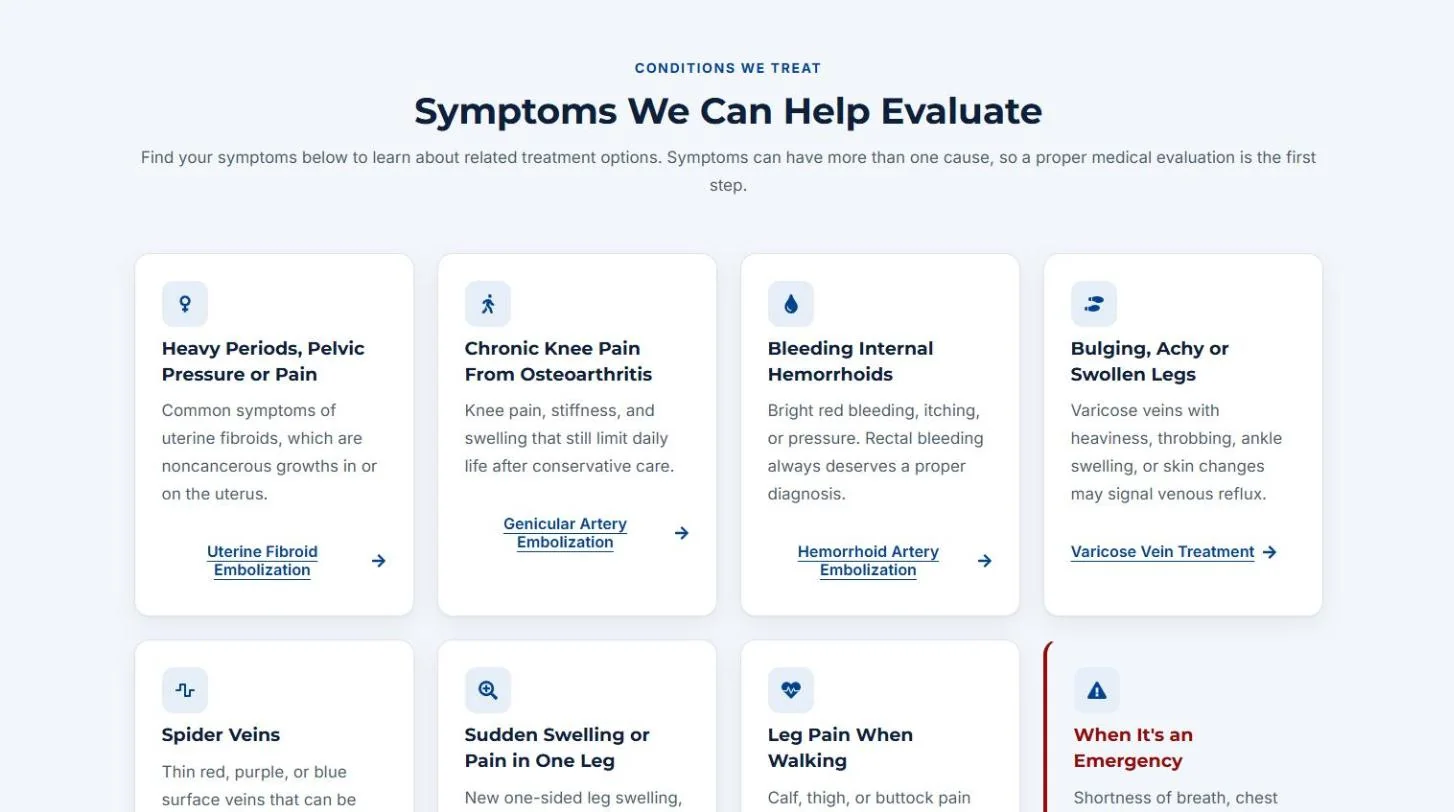
A website for an interventional radiology practice with offices in Oxon Hill and White Plains, MD and Springfield, VA, built in WordPress with Elementor. The homepage leads with booking and call actions, then connects treatments, symptoms, providers, insurance and the three office locations, so a patient can go from a symptom to the right procedure page and book.
- WordPress
- Elementor
- Healthcare website
- Appointment booking
Featured Case Study
Diagnosing a Google Ads Delivery Issue and Restoring Campaign Performance
A campaign that looked ready to run was barely running at all. The fix was not in the keywords or the ads. It was at the account level.
- Google Ads
- Account troubleshooting
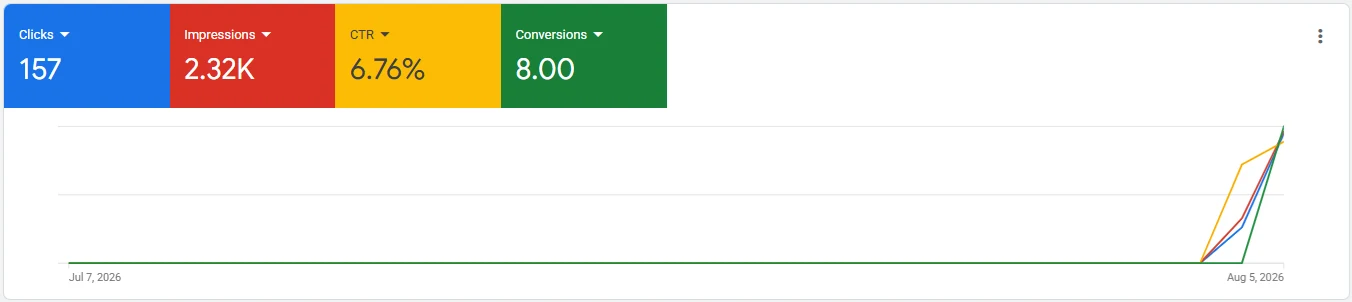
- Reporting window: Jul 7 to Aug 5, 2026
- ProblemCampaign set up, but barely delivering
- Root causeDormancy-related account hold
- Outcome8 tracked conversions the day after delivery resumed
Overview
A Google Ads campaign had been created and configured, and on paper it was ready to serve. Client and industry details are withheld for confidentiality.
The Challenge
Campaign activity was extremely limited or nonexistent. It looked like a performance problem, and the usual reaction is to start editing: new keywords, new ads, different bids, wider targeting, or a full rebuild. Every one of those changes costs time, makes it harder to tell what fixed what, and does nothing if the campaign is not the thing being blocked.
The Investigation
Instead of changing the campaign first, we reviewed the account and campaign setup systematically.
Several possible causes were on the list, working from the campaign up to the account:
- Campaign eligibility and status
- Ad approval
- Keywords
- Geographic targeting
- Budget
- Bidding
- Conversion tracking
- Landing page accessibility
- Billing and account status
- Account-level restrictions
The point was to find what was actually blocking delivery before touching anything that was working.
Root Cause
The campaign was not the problem. The investigation found a dormancy-related hold on the Google Ads account: an account-level restriction that stopped the campaign from delivering normally, however well it was configured.
Resolution
The account-level issue was addressed through the proper Google Ads account process, with no attempt to work around the restriction. Once the hold was cleared, the campaign began delivering again.
Results
Delivery resumed, and 8 tracked conversions were recorded the following day. We report these as tracked conversions, counted by the conversion actions set up in the account, not as leads or sales.
- 8tracked conversions
- 157clicks
- 2.32Kimpressions
- 6.76%click-through rate
Key Takeaway
Campaign troubleshooting should not always begin with keywords, bids or ad copy. When a campaign that should be running is not, check the layer above it first: account status, billing, eligibility and tracking. Rebuilding this campaign would have changed nothing, because the campaign was never the problem.
This is the kind of diagnosis we bring to Google Ads management and paid advertising.
Related services
The Services Behind This Work
Each project on this page maps to one of our service lines. If one of them looks like your problem, the service page explains how we approach it.
Paid advertising
Google Ads and Meta Ads
Campaign setup, tracking and troubleshooting, including account-level issues like the one in our case study.
CRM
CRM and GoHighLevel
Pipelines, workflows, AI calling and follow-up systems built inside GoHighLevel.
Automation
AI and Automation
Make, Zapier and n8n integrations that connect the tools your team already uses.
Search
SEO
Technical, content and local SEO, with keyword tracking so progress is measured.
Websites
Web Development
WordPress, Elementor and GoHighLevel sites built to load fast and capture leads.
Measurement
Analytics and Tracking
Lead source tracking, conversion setup and reporting that shows what is working.
Let's talk
Have a Similar Challenge?
Whether you need a website, an SEO strategy, a paid advertising campaign, a CRM system or an automated workflow, we can design a solution around your business goals.
No pressure, no obligation. If we are not the right fit, we will say so.